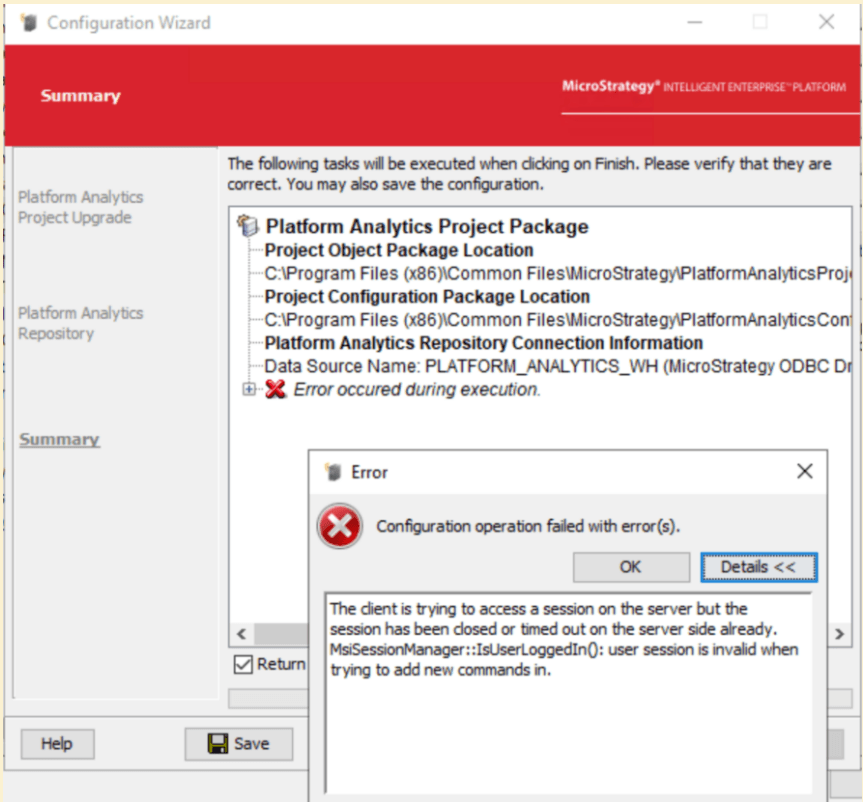
When upgrading Platform Analytics project in configuration wizard, below error pop up:
The client is trying to access a session on the server but the session has been closed or timed out on the server side already. MsiSessionManager::IsUserLoggedIn(): user session is invalid when trying to add new commands in.
In MACfgWiz.xml, same error we can get:
<log4j:event logger="MACfgWiz" timestamp="1717751840316" datetime="2024-06-07 17:17:20.316+0800" level="WARN" thread="SwingWorker-pool-3-thread-6">
<log4j:message><![CDATA[Fail to get PA project name: com.Strategy.web.objects.WebObjectsException: The client is trying to access a session on the server but the session has been closed or timed out on the server side already. MsiSessionManager::IsUserLoggedIn(): user session is invalid when trying to add new commands in.]]></log4j:message>
<log4j:locationInfo class="com.Strategy.tools.mautils.log.MAJLogger" method="warn" file="MAJLogger.java" line="312"/>
</log4j:event>

<log4j:event logger="MACfgWiz" timestamp="1717751840322" datetime="2024-06-07 17:17:20.322+0800" level="WARN" thread="SwingWorker-pool-3-thread-6">
<log4j:message><![CDATA[Fail to get PA project name: com.Strategy.web.objects.WebObjectsException: The client is trying to access a session on the server but the session has been closed or timed out on the server side already. MsiSessionManager::IsUserLoggedIn(): user session is invalid when trying to add new commands in.]]></log4j:message>
<log4j:locationInfo class="com.Strategy.tools.mautils.log.MAJLogger" method="warn" file="MAJLogger.java" line="312"/>
</log4j:event>

<log4j:event logger="MACfgWiz" timestamp="1717751840329" datetime="2024-06-07 17:17:20.329+0800" level="DEBUG" thread="SwingWorker-pool-3-thread-6">
<log4j:message><![CDATA[Internal Exception caught!]]></log4j:message>
<log4j:throwable><![CDATA[com.Strategy.web.objects.WebObjectsException: The client is trying to access a session on the server but the session has been closed or timed out on the server side already. MsiSessionManager::IsUserLoggedIn(): user session is invalid when trying to add new commands in.
	at com.Strategy.web.objects.WebClusterMembershipImpl.populate(Unknown Source)
	at com.Strategy.web.objects.WebClusterMembershipImpl.size(Unknown Source)
	at com.Strategy.tools.macfgwiz.backbone.common.Commons.getLocalClusterMember(Commons.java:2383)
	at com.Strategy.tools.macfgwiz.backbone.common.ProjectInfoProvider.getProjectStatusByName(ProjectInfoProvider.java:38)
	at com.Strategy.tools.macfgwiz.backbone.base.AbstractProjectConfigOp.continueIfProjectIsLoaded(AbstractProjectConfigOp.java:253)
	at com.Strategy.tools.macfgwiz.backbone.base.AbstractProjectConfigOp.importConfigurationPackage(AbstractProjectConfigOp.java:178)
	at com.Strategy.tools.macfgwiz.backbone.pa.impl.PaProjectConfigOpImpl.importConfigurationPackage(PaProjectConfigOpImpl.java:386)
	at com.Strategy.tools.macfgwiz.backbone.pa.impl.PaProjectConfigOpImpl.run(PaProjectConfigOpImpl.java:153)
	at com.Strategy.tools.macfgwiz.ui.common.ConfigurationProcedure.submit(ConfigurationProcedure.java:63)
	at com.Strategy.tools.macfgwiz.ui.common.CfgWizArchitect.submit(CfgWizArchitect.java:457)
	at com.Strategy.tools.macfgwiz.ui.graphic.steps.SummaryStep$ConfigurationExecutor.doInBackground(SummaryStep.java:2591)
	at com.Strategy.tools.macfgwiz.ui.graphic.steps.SummaryStep$ConfigurationExecutor.doInBackground(SummaryStep.java:2492)
	at java.desktop/javax.swing.SwingWorker$1.call(SwingWorker.java:304)
	at java.base/java.util.concurrent.FutureTask.run(FutureTask.java:264)
	at java.desktop/javax.swing.SwingWorker.run(SwingWorker.java:343)
	at java.base/java.util.concurrent.ThreadPoolExecutor.runWorker(ThreadPoolExecutor.java:1136)
	at java.base/java.util.concurrent.ThreadPoolExecutor$Worker.run(ThreadPoolExecutor.java:635)
	at java.base/java.lang.Thread.run(Thread.java:840)
Caused by: com.Strategy.webapi.MSTRWebAPIException: The client is trying to access a session on the server but the session has been closed or timed out on the server side already. MsiSessionManager::IsUserLoggedIn(): user session is invalid when trying to add new commands in.
	at com.Strategy.webapi.CDSSXMLClusterAdmin.GetClusterMembership(Unknown Source)
	... 18 more
]]></log4j:throwable>
<log4j:locationInfo class="com.Strategy.tools.mautils.log.MAJLogger" method="debug" file="MAJLogger.java" line="360"/>
</log4j:event>
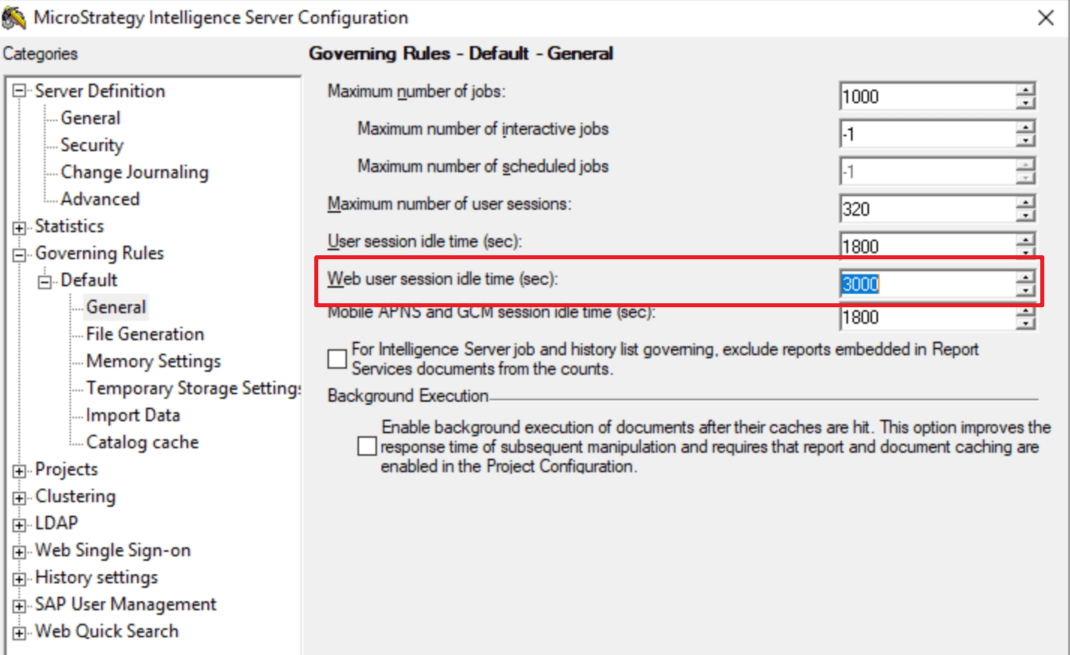
The user session on I-server side was timed out when configuration wizard try to access the user session.
Increase below setting, and restart I-server.