See the following possible symptoms:
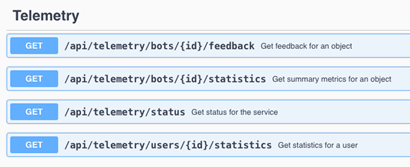
/api/telemetry/return 404 errors
The Telemetry Service cannot be managed correctly by Workstation Topology or the Service scripts (Service Strategy status or the direct scripts in
/etc/init.d). When the service starts or checks status using these two workflows, the service will never be started in the Telemetry Service mode, and will return an incorrect Stopped status, even if the telemetry service is running.
/opt/mstr/PlatformAnalytics/bin/platform-analytics-consumer.sh start/stop/status.
To check that the telemetry service was started in the correct mode and is running:
platform-analytics-consumer_yyyy-mm-dd.logand see the Spring Boot logo, as shown below.

platform-analytics-consumer.logfor the following line:
2024-06-18 12:58:03,061 INFO TelemetryServiceApplication:49 - Starting Telemetry Service Application
Strategy ONE (June 2024) introduces a new mode of the Platform Analytics consumer, now known as the Telemetry Service, which exposes a set of APIs to allow new workflows to directly interact with the
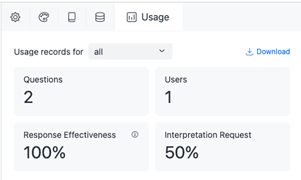
platform_analytics_whwithout going through the Platform Analytics project. The first set of APIs is focused on Auto adoption metric. In Strategy ONE (June 2024), the APIs power a new Usage panel in Bots and Dashboards that have Strategy AI enabled. You can use this update to view aggregated statistics on the usage of your Strategy AI content and download CSVs with more detailed telemetry.
configOverride.propertieson each library node has the following configuration and was restarted after the configuration was in place:
service.telemetry.baseURL="https://<primary node hostname>:<default port 8222>
features.telemetryService.supported = true
PAConsumerConfig.yamlhas the following configuration:
telemetryService:
port: 8222
identityToken:
secretKey:
"+b34hO/BwSNrLD764j/r+S+twXyl4Qbe/6K+LB6GRnYtJD2CrtbWL0ykxw0EC5yzBx/CzJZOFRL2zjXJmC0S4tIV3DLLjxisMnQoZf3hihXHCxKYHK8/1IaTHWgSB7MsNUk2cd7/hzs=,iQGNGpLBjTYfjRy8"
secretKeymatches the
identityToken.secretKeyfrom the library
configOverride.propertiesfile after it has been encrypted by the
platform-analytics-encryptor.sh
