EducationSoftwareStrategy.com
StrategyCommunity

Knowledge Base

Product

Community

Knowledge Base

TopicsBrowse ArticlesDeveloper Zone

Product

Download SoftwareProduct DocumentationSecurity Hub

Education

Tutorial VideosSolution GalleryEducation courses

Community

GuidelinesGrandmastersEvents
x_social-icon_white.svglinkedin_social-icon_white.svg
Strategy logoCommunity

© Strategy Inc. All Rights Reserved.

LegalTerms of UsePrivacy Policy
  1. Home
  2. Topics

KB486846: How to set a custom PDF format for an email subscription created in MicroStrategy Web which is based on a report


Sebastian Herrendorf

Senior Support Engineer • MicroStrategy


This article describes how to set a custom PDF Format for a Email subscription created in MicroStrategy Web which is based on a report.

Steps

The first step is to enable the option exportOptionReferrer (please see KB32162  for further reference).
This setting will save any export option changes for a specific report as default for a single subscription execution by the same user.

  1. Go to the Strategy Web application folder in the WebServer and edit the sys_defaults.xml file (...\MicroStrategy\WEB-INF\xml)
  2. Find parameter 'exportOptionReferrer' and edit its value to 1 (v="1")
  3. Restart the web server.

To leverage this functionality:

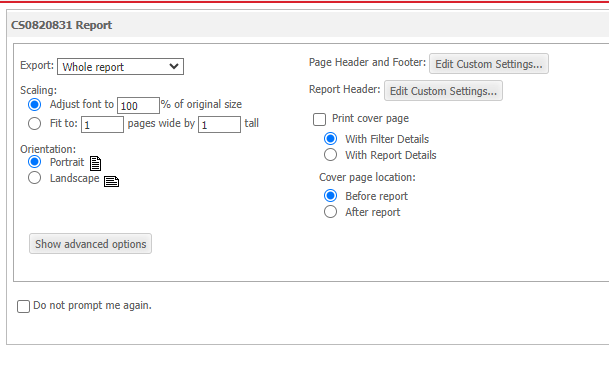
  • Run a report in Strategy Web and Navigate to Report Home > Export > PDF                                                                                                          
ka0PW0000002V4XYAU_0EMPW000007ldl3.jpeg
  • Select the desired formatting and run the export until it completes and shows the file           
ka0PW0000002V4XYAU_0EMPW000007ldmf.jpeg
  • Go back to the report, and create a new subscription with Report Home > Subscribe to > Email (or any)                                        
ka0PW0000002V4XYAU_0EMPW000007ldoH.jpeg
  • Select the same Delivery Format and any other appropriate options as needed and click OK
ka0PW0000002V4XYAU_0EMPW000007ldpt.jpeg
  • This subscription will retain the same format options selected in step 2.

If a new subscription is created and a specific format is needed, the process must be repeated from step 1 (after "To leverage this functionality").


Comment

0 comments

Details

Knowledge Article

Published:

June 28, 2024

Last Updated:

June 28, 2024