EducationSoftwareStrategy.com
StrategyCommunity

Knowledge Base

Product

Community

Knowledge Base

TopicsBrowse ArticlesDeveloper Zone

Product

Download SoftwareProduct DocumentationSecurity Hub

Education

Tutorial VideosSolution GalleryEducation courses

Community

GuidelinesGrandmastersEvents
x_social-icon_white.svglinkedin_social-icon_white.svg
Strategy logoCommunity

© Strategy Inc. All Rights Reserved.

LegalTerms of UsePrivacy Policy
  1. Home
  2. Topics

KB486854: "The storage location could not be connected" or "Failed to create package" error message when using Migrations feature in MicroStrategy 2021


Chris Robinson

Principal Product Specialist • Strategy


This article describes a potential cause for dealing with "The storage location could not be connected" or "Failed to create package" error messages received when creating or testing storage service.

Symptom

When testing Storage Service in Strategy 2021, the test connection attempt can fail with "The storage location could not be connected" error message. 

ka0PW0000002XXlYAM_0EMPW000007qLcH.jpeg

 
Alternatively, "Failed to create package" error message can be thrown when attempting to create a new migration package.
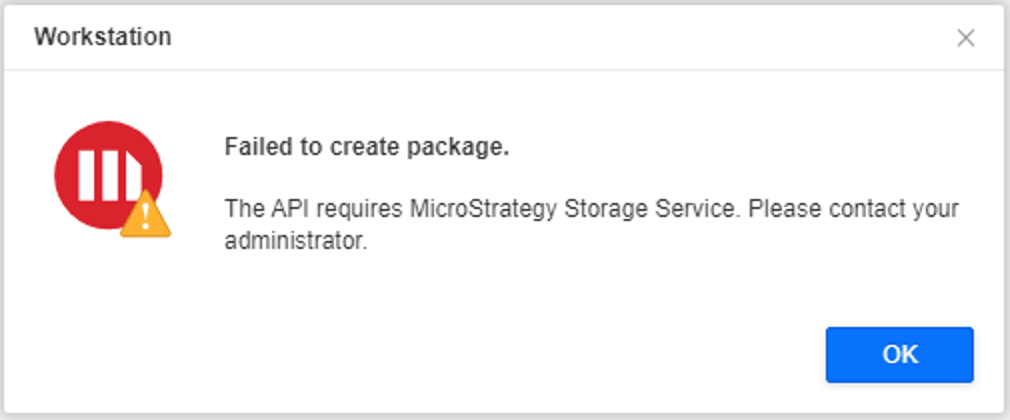
ka0PW0000002XXlYAM_0EMPW000007qZKD.jpeg

Cause

This can occur due to the storage location not being available to the Unix user running Tomcat. It is possible the directory itself does not exist or the user does not permissions to the directory.
Strategy Library Log Sample:


{...RestError [code=ERR021, iServerErrorCode=0, message=The shared folder location can not be found, or the location is not a directory., httpStatusCode=400, ticketId=ef9e4e27f5d145618d8c6c1814b96a7f]"...}


Action

Coordinate with system admin of machine running Tomcat to ensure the directory exists and the user running Tomcat has the proper privileges.


Comment

0 comments

Details

Knowledge Article

Published:

July 25, 2024

Last Updated:

July 25, 2024