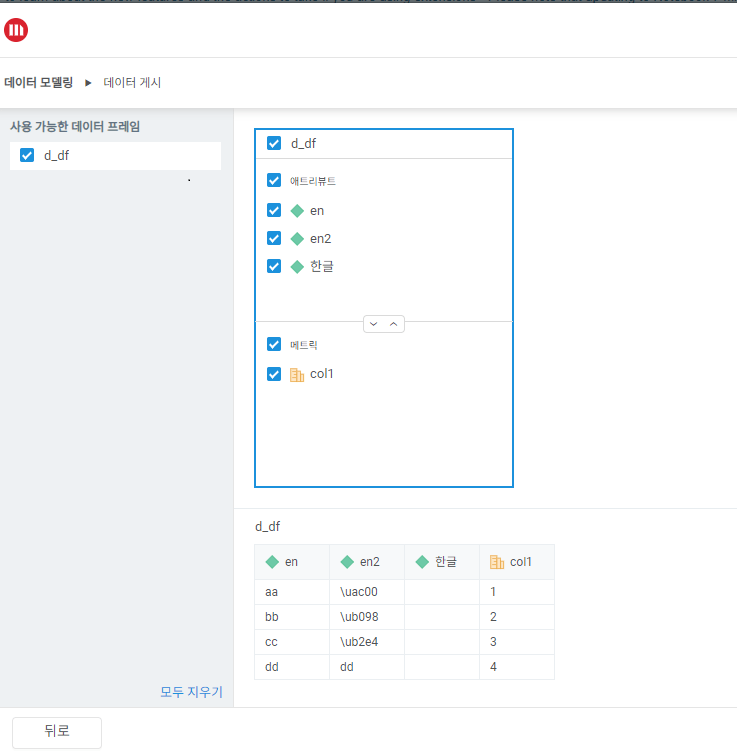
When a user exports the cube from DataFrame which is created with a report having Korean named metric or attribute values using mstrio-py, all Korean values are blanks or showing as UTF-8 code (Unicode Escape Sequence) in the preview page.
Also, The below error message is observed during export the cube in mstrio-py.
ValueError                                Traceback (most recent call last)
Cell In[3], line 16
     14 # Data Export
     15 mstr_dataset = SuperCube(mstr_connection, name="Jupyter_Notebook_KR_Output01")
---> 16 mstr_dataset.add_table(
     17   name="result",
     18   data_frame=mstrio_env['result'],
     19   update_policy="replace",
     20   to_metric=["col1"],
     21   to_attribute=["한글","ENG","국어"]
     22 )
     23 mstr_dataset.create(folder_id="8D67909211D3E4981000E787EC6DE8A4", force="True")

File C:\SDK\Python311\Lib\site-packages\mstrio\project_objects\datasets\super_cube.py:332, in SuperCube.add_table(self, name, data_frame, update_policy, to_metric, to_attribute)
    330 if to_attribute is not None:
    331     if any(col for col in to_attribute if col not in data_frame.columns):
--> 332         raise ValueError(
    333             "Column name(s) in `to_attribute` were not found in"
    334             " `DataFrame.columns`."
    335         )
    336     else:
    337         table["to_attribute"] = to_attribute

ValueError: Column name(s) in `to_attribute` were not found in `DataFrame.columns`.
1. Create a data frame containing Korean (object name, element value)
df={'col1':[1,2,3,4],'한글':['aa','bb','cc','dd'],'ENG':['AA','가','나','BB'],'국어':['가','나','AA','BB']}
result=pd.DataFrame(df)
result
col1 한글 ENG 국어
0 1 aa AA 가
1 2 bb 가 나
2 3 cc 나 AA
3 4 dd BB BB

2. If the object name is in Korean, the value cannot be retrieved (Blank), and if the result values of the object is in Korean, it is output as UTF-8 code (Unicode Escape Sequence) in the preview page.
This issue is a known issue in Strategy 2021 and Strategy ONE
Contact Strategy Support for the latest status of this issue.
