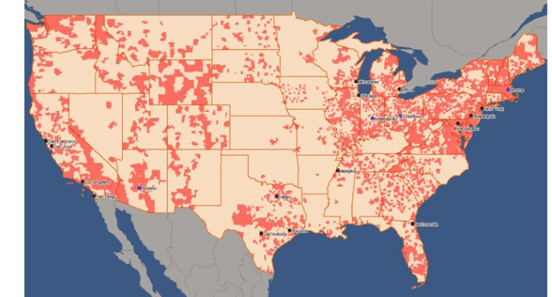
To meet analytical demands, sometimes users need to add a custom map layer to the built-in ESRI map in dashboards on Strategy Web and/ or Library. The below screenshot is an example of Wire Center boundary map layer (source: https://sgsi.com/telecommunications-maps-and-data/). This document provides step-by-step instructions to integrate the custom map layer with dashboards.
./tomcat/webapps/MicroStrategy/plugins/ConnectorForMap/WEB-INF/xml/config/mapConfig.xml
./tomcat/webapps/StrategyLibrary/plugins/ConnectorForMap/WEB-INF/xml/config/mapConfig.xml
A dummy key is shown in the following example.
<apps clientToken="true">
<key> <![CDATA[000000000123455677788888xxxxxxxxxxxxxxxxxxxxxxxxxxxxxxxxxxxxxxxxxxxxxxxxxxxxxxxxxxxxxxxxxxxxx]]> </key>
</apps>
By default, the map server is https://services.arcgisonline.com/arcgis/rest/services/Elevation/World_Hillshade/MapServer
<!—The layer id can be any unique integer -->
<layer id="7"
title="WireCenters" ml="https://gis.arcgis.xxxx.xxxx.ca/arcgis/rest/services/WC_Boundary/FeatureServer/0"/>
<!-- The following values identify the geo-role of the primary (roleId) and secondary (sfr) geo attributes in the <shape> node -->
roleId 1 = "City"
roleId 2 = "State"
roleId 3 = "Country"
roleId 4 = "Location"
roleId 5 = "Latitude"
roleId 6 = "Longitude"
roleId 7 = "Other"
roleId 8 = "ZipCode"
roleId 9 = "County"
<shape id="700"
desc="Wire Center Boundaries"
roleId="7"
type="Polygon"
descWeb="mstrweb.9229"
descFlash="mstr.1622"
descDesktop="26973"
qf="['wc_clli','cc_name','layer_id']"
ea="wc_clli"
layerId="7" />
A complete example mapConfig.xml file is attached.
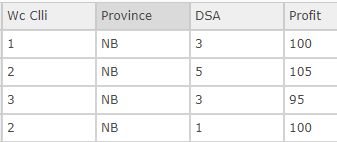
“Wc Clli” represents Wire Center ID and DSA means Distribution Service Area ID. They are the identifier for a distribution service area and are in m:m parent-child relationship.
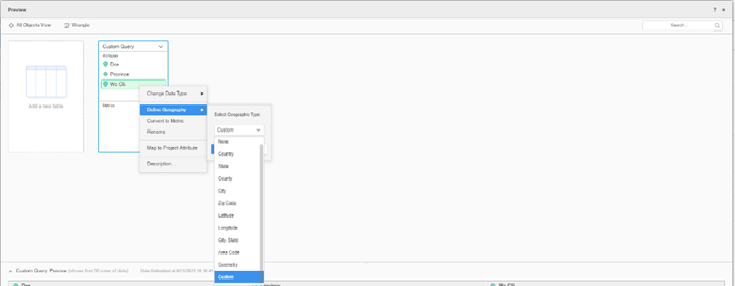
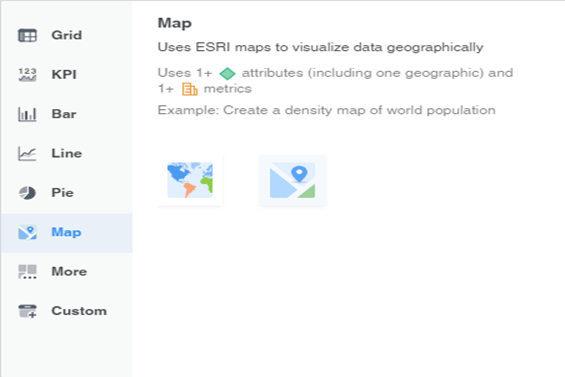
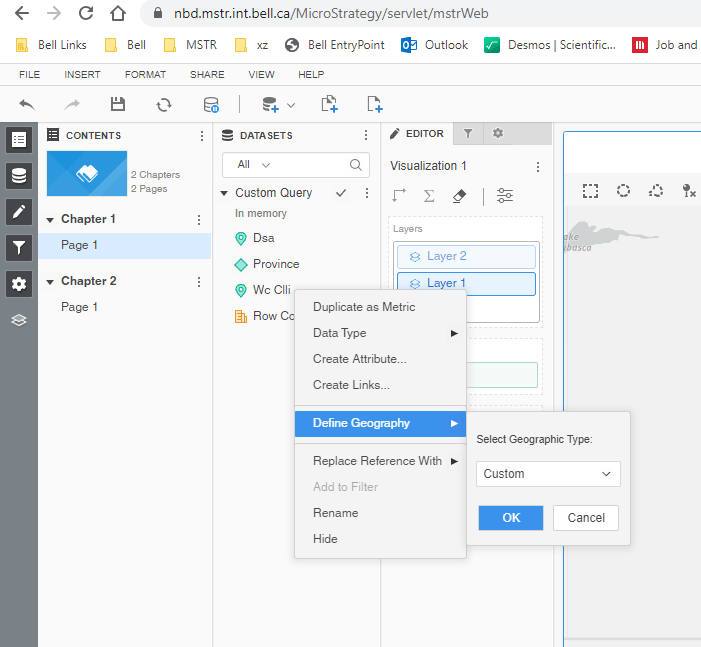
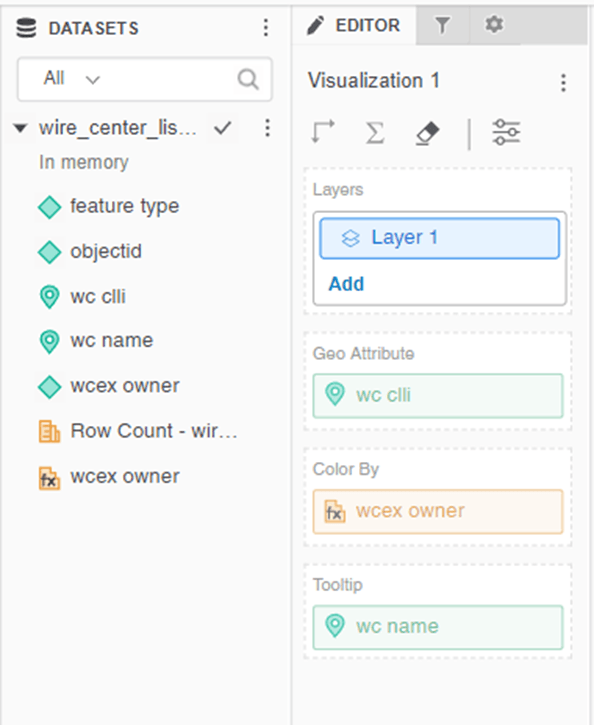
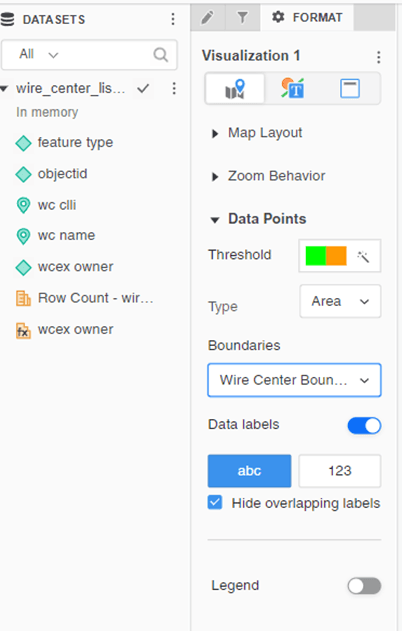
Then the map layer will be displayed on top of the built-in ESRI Map.
MSTR Web/ Library sends a request similar to the following one to the feature server (https://gis.arcgis. xxxx.xxxx.ca/arcgis/rest/services/WC_Boundaries/FeatureServer/0 in this example) to get the map layer data and then display the wire centre areas. The attribute in the where clause is defined according to the ea value in the shape node in mapConfig.xml and the list of wire centre IDs is obtained from the Geo Attribute element list in the dataset, that is, “Wc Clli”.
https://gis.arcgis. xxxx.xxxx.ca/arcgis/rest/services/WC_Boundaries/FeatureServer/0/query?f=json&outFields=WC_CLLI%2CBND_NAME%2CLAYER_ID&outSR=4326&spatialRel=esriSpatialRelIntersects&where=(wc_clli%20in%20(XXXXXX))%20AND%20(1%3D1)
The following configuration file has been tested and confirmed working as expected. For security purpose, the highlighted map key is hidden.
The parts in the yellow background is related to the custom Wire Center Boundaries map layer used as the example.
<mc>
	<!-- ESRI map configuration -->
	<ec>
		<bms>
		</bms>
		<pjs>
		</pjs>
		<!-- End of nodes used for on-premises map integration -->

		<!-- The following nodes are used for cloud-based map integration, including out-of-the-box map integration -->
		<apps clientToken="true">
			<key> <![CDATA[00000000017383xxxxxxxxxxxxxxxxxxxxxxxxxxxxxxxxxxxxxxxxxxxxxxxxxxxxxxxxxxxxxxxxxxxxxxxxxxxxxxxxxxxxxxxxxxxxxxxxxxxxxxxxxxxxxxxxxxxxxxxxxxxxxxxxxx]]> </key>
		</apps>

		<webmaps>
		</webmaps>

		<layers>
			<layer id="1"
			title="US-States"
			ml="http://services.arcgis.com/P3ePLMYs2RVChkJx/arcgis/rest/services/USA_States_Generalized/FeatureServer/0"/>
			<layer id="2"
			title="US-ZipCodes"
			ml="http://services.arcgis.com/P3ePLMYs2RVChkJx/arcgis/rest/services/USA_ZIP_Codes/FeatureServer/0"/>
			<layer id="3"
			title="US-Counties"
			ml="http://services.arcgis.com/P3ePLMYs2RVChkJx/arcgis/rest/services/USA_Counties_Generalized/FeatureServer/0"/>
			<layer id="4"
			title="World-Countries Detailed"
			ml="http://services.arcgis.com/P3ePLMYs2RVChkJx/arcgis/rest/services/World_Countries/FeatureServer/0" />
			<layer id="5"
			title="World-Countries Generalized"
			ml="http://services.arcgis.com/P3ePLMYs2RVChkJx/arcgis/rest/services/World_Countries_(Generalized)/FeatureServer/0" />
			<layer id="6"
			title="World-Admin-Divisions"
			ml="http://services.arcgis.com/P3ePLMYs2RVChkJx/arcgis/rest/services/World_Administrative_Divisions/FeatureServer/0"/>
			<layer id="7"
			title="WireCentres"
			ml="https://gis.arcgis.xxxx.xxxx.ca/arcgis/rest/services/WC_Boundaries/FeatureServer/0"/>
		</layers>

		<!-- The following values identify the geo-role of the primary (roleId) and secondary (sfr) geo attributes in the <shape> node
        roleId 1 = "City"
        roleId 2 = "State"
        roleId 3 = "Country"
        roleId 4 = "Location"
        roleId 5 = "Latitude"
        roleId 6 = "Longitude"
        roleId 7 = "Other"
        roleId 8 = "ZipCode"
        roleId 9 = "County"
		-->

		<!-- End of values that identify geo-role of the primary (roleId) and secondary (sfr) geo attributes -->
		<shapes>
			<shape id="100"
			default="true"
			desc="US State Names"
			roleId="2"
			type="Polygon"
			descWeb="mstrweb.9229"
			descFlash="mstr.1622"
			descDesktop="26973"
			qf="['STATE_NAME']"
			ea="state_name"
			layerId="1" />
			<shape id="200"
			desc="US State Abbreviations"
			roleId="2"
			type="Polygon"
			descWeb="mstrweb.9229"
			descFlash="mstr.1622"
			descDesktop="26973"
			qf="['state_abbr']"
			ea="state_abbr"
			layerId="1" />
			<shape id="300"
			desc="US Zip Codes"
			roleId="8"
			type="Polygon"
			descWeb="mstrweb.9229"
			descFlash="mstr.1622"
			descDesktop="26973"
			qf="['ZIP']"
			ea="ZIP"
			layerId="2"/>
			<shape id="400"
			desc="Countries of World"
			roleId="3"
			type="Polygon"
			descWeb="mstrweb.9229"
			descFlash="mstr.1622"
			descDesktop="26973"
			qf="['ISO','Country']"
			ea="Country"
			layerId="5" />
			<shape id="500"
			desc="World Admin Divisions"
			roleId="2"
			type="Polygon"
			descWeb="mstrweb.9229"
			descFlash="mstr.1622"
			descDesktop="26973"
			qf="['NAME']"
			ea="NAME"
			layerId="6" />
			<shape id="600"
			desc="US Counties"
			roleId="9"
			type="Polygon"
			descWeb="mstrweb.9229"
			descFlash="mstr.1622"
			descDesktop="26973"
			qf="['NAME']"
			sf="STATE_NAME"
			sfr="2"
			pk="FID"
			ea="NAME"
			layerId="3" />
			<shape id="700"
			desc="Wire Center Boundaries"
			roleId="7"
			type="Polygon"
			descWeb="mstrweb.9229"
			descFlash="mstr.1622"
			descDesktop="26973"
			qf="['WC_CLLI','BND_NAME','LAYER_ID']"
			ea="wc_clli"
			layerId="7" />
		</shapes>

		<urlPrefixes>
			<urlPrefix id="1">www.arcgis.com</urlPrefix>
			<urlPrefix id="2">services.arcgis.com</urlPrefix>
			<urlPrefix id="3">js.arcgis.com</urlPrefix>
			<urlPrefix id="4">static.arcgis.com</urlPrefix>
			<urlPrefix id="5">geocode.arcgis.com</urlPrefix>
			<urlPrefix id="6">services.arcgisonline.com</urlPrefix>
			<urlPrefix id="7">cdn.arcgis.com</urlPrefix>
			<urlPrefix id="8">basemaps.arcgis.com</urlPrefix>
			<urlPrefix id="9">basemaps-api.arcgis.com</urlPrefix>
			<urlPrefix id="10">server.arcgisonline.com</urlPrefix>
			<urlPrefix id="11">sampleserver1.arcgisonline.com</urlPrefix>
			<urlPrefix id="12">sampleserver2.arcgisonline.com</urlPrefix>
			<urlPrefix id="13">msfvzm4ehacvflca.maps.arcgis.com</urlPrefix>
		</urlPrefixes>
	</ec>

	<!-- Google map configuration -->
		<!-- <gc></gc> -->
		<!-- MapBox configuration -->
</mc>
