EducationSoftwareStrategy.com
StrategyCommunity

Knowledge Base

Product

Community

Knowledge Base

TopicsBrowse ArticlesDeveloper Zone

Product

Download SoftwareProduct DocumentationSecurity Hub

Education

Tutorial VideosSolution GalleryEducation courses

Community

GuidelinesGrandmastersEvents
x_social-icon_white.svglinkedin_social-icon_white.svg
Strategy logoCommunity

© Strategy Inc. All Rights Reserved.

LegalTerms of UsePrivacy Policy
  1. Home
  2. Topics

KB486885: How to hide server name next to project name in project list in MicroStrategy Web ONE March 2024


Mengran (Molly) Wang

Senior Cloud Support Engineer III • MicroStrategy


This article describe SDK method to create a plugin hiding server name next to project name in project list in MicroStrategy Web ONE March 2024. It is achieved by modifying global.css file.

Introduction

Sometimes server name is not expected to be displayed in project list, as below:

ka0PW0000002fiDYAQ_0EMPW000008LnIr.jpeg

The server name cannot be hidden using out-of-the-box option, but user can create a plugin to hide it using css method.

Steps

1. in WCE, create a new plugin, for example  "removeservername"
2. On the CSS Settings tab, expand CSS.  
3. Expand Strategy WebStyles, then expand style, then expand mstr.
4. Create a new selector named: .mstrMenuItem a .serverName
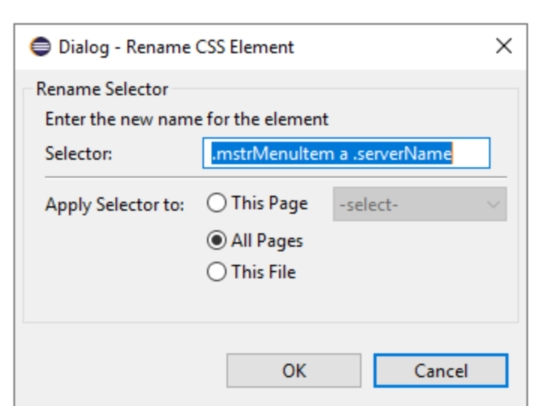
ka0PW0000002fiDYAQ_0EMPW000008LnSX.jpeg

5. Add property:
display=none!important

ka0PW0000002fiDYAQ_0EMPW000008LlVd.jpeg

6. save the plugin. See there is a globa.css file generated under style folder:

ka0PW0000002fiDYAQ_0EMPW000008LnYz.jpeg

With content:
    .mstrMenuItem a .serverName {
        display:         none !important;
    }
7. Restart tomcat to take effect.
8. Login web, the server name is hidden as expected:

ka0PW0000002fiDYAQ_0EMPW000008LnQw.jpeg

Comment

0 comments

Details

Knowledge Article

Published:

December 15, 2024

Last Updated:

December 15, 2024