EducationSoftwareStrategy.com
StrategyCommunity

Knowledge Base

Product

Community

Knowledge Base

TopicsBrowse ArticlesDeveloper Zone

Product

Download SoftwareProduct DocumentationSecurity Hub

Education

Tutorial VideosSolution GalleryEducation courses

Community

GuidelinesGrandmastersEvents
x_social-icon_white.svglinkedin_social-icon_white.svg
Strategy logoCommunity

© Strategy Inc. All Rights Reserved.

LegalTerms of UsePrivacy Policy
  1. Home
  2. Topics

KB486914: A “Failed to fetch” error appears when logging in to the MicroStrategy connector


Mikolaj Wus

Lead, Cloud Support • MicroStrategy


This article explains one possible cause of the “Failed to fetch” error when trying to log in to Library Server using the MicroStrategy connector.

Symptom


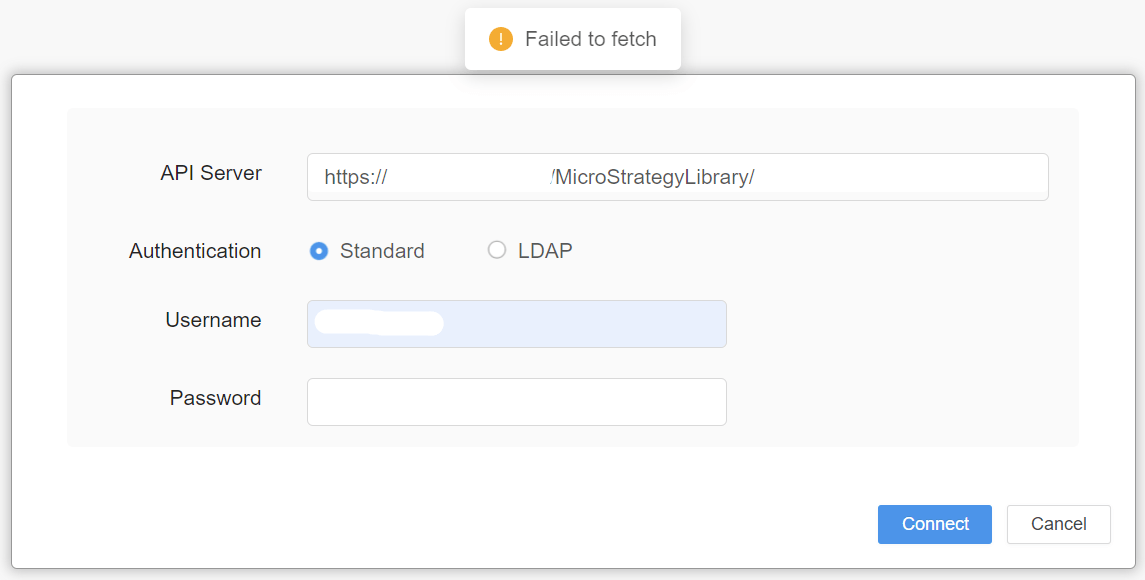
After successfully deploying the Strategy connector, when trying to import data from another Strategy environment and/or project, it is not possible to log in to Library Server. A “Failed to fetch” error message appears on the screen. Additionally, network traces show a 403 HTTP code response from the Library Server.
 

ka0PW00000030GPYAY_0EMPW000008hwH3.jpeg


Steps to Reproduce

  1. Deploy and configure the Strategy connector by following the MicroStrategy connector documentation.
  2. Log in to Strategy Web.
  3. Click on “Add External Data”.
  4. Click on “Strategy” to use the Strategy connector.
  5. Fill in the Library Server details, and press “Connect”.


Cause


This error may be caused by an incorrect Java version when running Strategy Web, Strategy Library or the Strategy connector on Tomcat. For example, this error will appear when running Strategy 2021 Update 12 on Tomcat 9.x with Java 17 configured.
 

Action


Ensure to use a Java version that is certified for the Strategy Version being used. In the given example, for Strategy 2021 Update 12, Java 11 needs to be installed. To double check which Java version is certified for the Strategy version, please review the MicroStrategy Certifications Dashboard.
To learn about other reasons that could be causing this issue, see KB483744: An error appears when logging in to the MicroStrategy connector. 


Comment

0 comments

Details

Knowledge Article

Published:

August 13, 2024

Last Updated:

August 13, 2024