Due to recent Apple policy updates, apps compiled with the Library Mobile SDK or Strategy Mobile SDK may encounter submission errors if certain criteria are unmet. Here are two common errors and guidance on how to address them.
Apple now requires all third-party frameworks in an app submission to be signed. If your app lacks this, the submission will fail with a message similar to:
ITMS-91065: Missing signature - Your app includes “Frameworks/MSTRInfrastructureCore.framework/MSTRInfrastructureCore”, which includes BoringSSL / openssl_grpc, an SDK that was identified in the documentation as a privacy-impacting third-party SDK. If a new app includes a privacy-impacting SDK, or an app update adds a new privacy-impacting SDK, the SDK must include a signature file. Please contact the provider of the SDK that includes this file to get an updated SDK version with a signature. For details about verifying the code signature for a third-party SDK, visit: https://developer.apple.com/documentation/xcode/verifying-the-origin-of-your-xcframeworks.
Solution:
Sign all dependent
xcframeworksmanually:
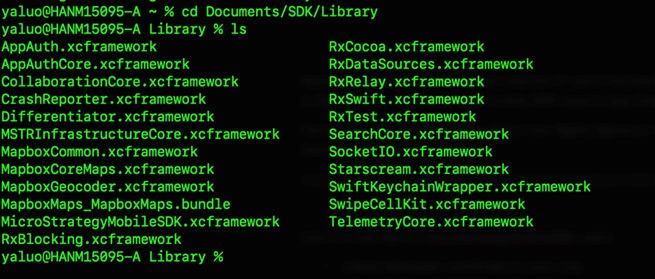

for filename in *; do codesign --timestamp -v --sign "<<your apple developer certificate>>" ${filename} ; done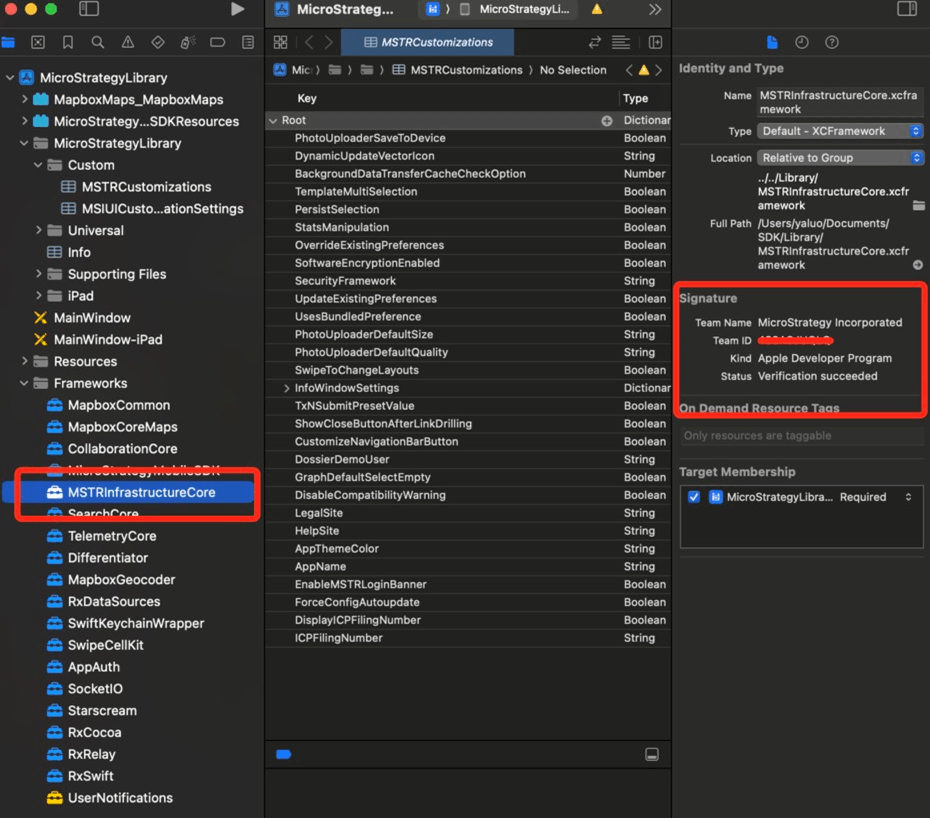
Starting November 12, 2024, apps with third-party SDKs must include a privacy manifest. If using SDK version 24.09 or earlier, you may receive a warning such as:
ITMS-91061: Missing privacy manifest - Your app includes “Frameworks/AppAuth.framework/AppAuth”, which includes AppAuth, an SDK that was identified in the documentation as a privacy-impacting third-party SDK. Starting November 12, 2024, if a new app includes a privacy-impacting SDK, or an app update adds a new privacy-impacting SDK, the SDK must include a privacy manifest file. Please contact the provider of the SDK that includes this file to get an updated SDK version with a privacy manifest. For more details about this policy, including a list of SDKs that are required to include signatures and manifests, visit: https://developer.apple.com/support/third-party-SDK-requirements.
Solution:
Update to the latest SDK version (available from November 2024) from our download site to resolve this issue.
