When triggering an update cache subscription for a SAML user in Strategy Workstation, user can observe that the trigger failed with "Failure in LDAP anonymous login" error:

LDAP authentication is not configured at server-level, and is not enabled for Library. At the same time, Distinguished name is filled out in User Editor:
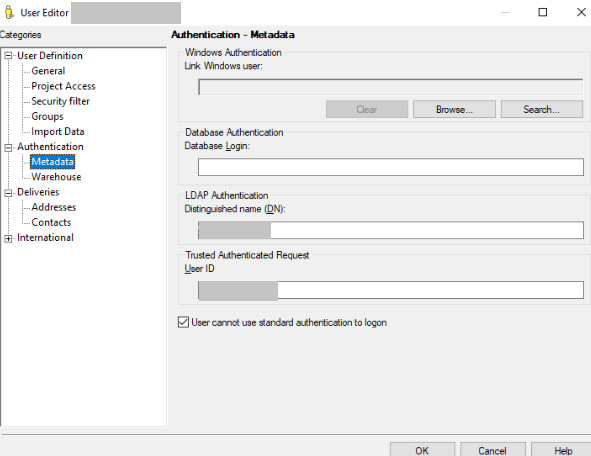
Distinguished name is passed from SAML Identity Provider to Strategy User.
There are three ways to resolve this error (only one needs to be applied):
1. Contact SAML IDP admin team to avoid passing Distinguished name to Strategy
2. Modify "MstrSamlConfig.xml" to change the name of "dnAttributeName", so Strategy it will not be able to retrieve the DistinguishedName value from the SAML Response. Restart the web application server after making the change.
Current:
<dnAttributeName>DistinguishedName</dnAttributeName>

Expected:
<dnAttributeName>DistinguishedNameChange</dnAttributeName>
3. Disable the "Synch user at logon" option, and then restart the Intelligence Server for the change to take effect.
Please note: After disabling it, not only the Distinguished Name will not be synchronized but other login information, such as Groups and Email.

