EducationSoftwareStrategy.com
StrategyCommunity

Knowledge Base

Product

Community

Knowledge Base

TopicsBrowse ArticlesDeveloper Zone

Product

Download SoftwareProduct DocumentationSecurity Hub

Education

Tutorial VideosSolution GalleryEducation courses

Community

GuidelinesGrandmastersEvents
x_social-icon_white.svglinkedin_social-icon_white.svg
Strategy logoCommunity

© Strategy Inc. All Rights Reserved.

LegalTerms of UsePrivacy Policy
  1. Home
  2. Topics

KB486966: Troubleshooting 'java.lang.NoSuchMethodException' Error when Selecting 'Limit Element Source' for Dashboards with Multiple Datasets in Workstation


Cleeva D'Souza

Senior Cloud Support Engineer II • Strategy


This technical article explains why the 'java.lang.NoSuchMethodException' error occurs when selecting the 'Limit Element Source' option for certain Dashboards that have multiple datasets.

Symptom 

Strategy ONE (June 2024) introduces the option to Limit the Source of Chapter Filter Elements, which enhances performance by allowing users to select a dataset as the source for attribute elements in chapter filters. To enable this setting, follow these steps:

  1. Open the Filter panel.
  2. Click on "More" at the top of the panel, choose "Limit Element Source," and select a dataset.


Steps to Reproduce in Strategy Tutorial 

  1. In Strategy Workstation, connect to any environment prior to the Strategy ONE June 2024 release.
  2. Create a Dashboard with two datasets: one with Region and Call Center, and the other with Region and Country. (Filter the region to import Canada and Central while importing.)
  3. Create a grid with an element or value filter and add Region as the filter. Choose Grid as the target.
  4. For the Selector, click on the three dots and choose "Limit Element Source." Then, select the second dataset.
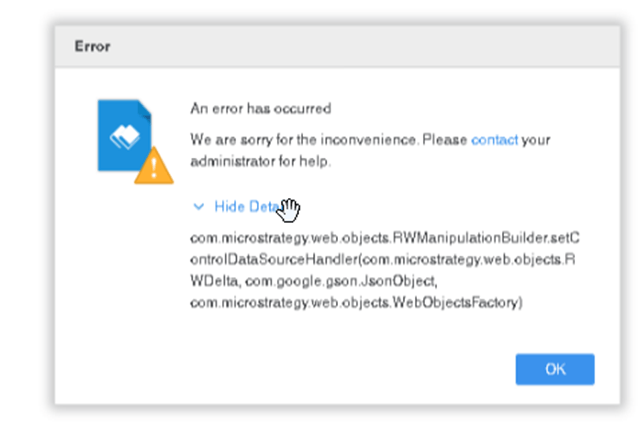
  5. The error message
    'com.Strategy.web.objects.RWManipulationBuilder.setControlDataSourceHandler(com.Strategy.web.objects.RWDelta, com.google.gson.JsonObject, com.Strategy.web.objects.WebObjectsFactory)' appears.
ka0PW0000003CHZYA2_0EMPW00000AdUJp.jpeg


Cause

This error occurs in environments prior to the Strategy ONE June 2024 release when connected via the latest version of Strategy Workstation. Since this feature is only available starting from the Strategy ONE June 2024 release, any prior versions of environments will encounter this error.
 

Solution

To resolve this issue, upgrade to the latest version of Strategy. By doing so, you will be able to utilize the 'Limit Element Source' feature without encountering the 'java.lang.NoSuchMethodException' error.


Comment

0 comments

Details

Knowledge Article

Published:

November 27, 2024

Last Updated:

November 27, 2024