EducationSoftwareStrategy.com
StrategyCommunity

Knowledge Base

Product

Community

Knowledge Base

TopicsBrowse ArticlesDeveloper Zone

Product

Download SoftwareProduct DocumentationSecurity Hub

Education

Tutorial VideosSolution GalleryEducation courses

Community

GuidelinesGrandmastersEvents
x_social-icon_white.svglinkedin_social-icon_white.svg
Strategy logoCommunity

© Strategy Inc. All Rights Reserved.

LegalTerms of UsePrivacy Policy
  1. Home
  2. Topics

KB487028: After in-place upgrade in Linux OS, the installation is in activated status automatically


Ruiyu Han

Senior Support Engineer • MicroStrategy


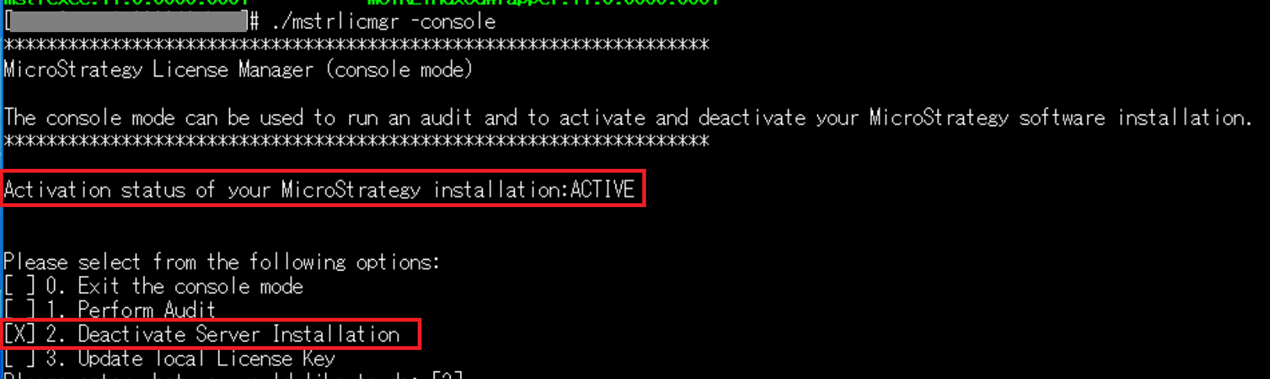
After performing an in-place upgrade for MicroStrategy in Linux OS, when users tried to perform the installation activation from License Manager, they found the installation is already in activated status without any manual operations.

Symptom

 
Below is the image when checking the activation status with License Manager console mode after in-place upgrade:
ka0PW000000479NYAQ_0EMPW00000C2Xdh.jpeg

Steps to Reproduce
 
Perform an in-place upgrade for Linux OS.
 
Solution
 
This is the expected behavior for Strategy running in Linux OS.
For in-place upgrade of Strategy in Linux OS, if the license key has not been changed and no server product / web product is added or removed, the installation will stay in active mode, and the re-activation is not required.
For Strategy running in Windows OS, re-activation will always be required after in-place upgrade.


Comment

0 comments

Details

Knowledge Article

Published:

December 26, 2024

Last Updated:

December 26, 2024