EducationSoftwareStrategy.com
StrategyCommunity

Knowledge Base

Product

Community

Knowledge Base

TopicsBrowse ArticlesDeveloper Zone

Product

Download SoftwareProduct DocumentationSecurity Hub

Education

Tutorial VideosSolution GalleryEducation courses

Community

GuidelinesGrandmastersEvents
x_social-icon_white.svglinkedin_social-icon_white.svg
Strategy logoCommunity

© Strategy Inc. All Rights Reserved.

LegalTerms of UsePrivacy Policy
  1. Home
  2. Topics

KB487041: HMTL container is presented to a user in MicroStrategy Web after closing the dashboard in MicroStrategy June 2024 – September 2024


Katarzyna Olszewska

Senior Cloud Support Engineer III • MicroStrategy


This article describes an issue encountered while using "My Page" option for a project.

Symptom 

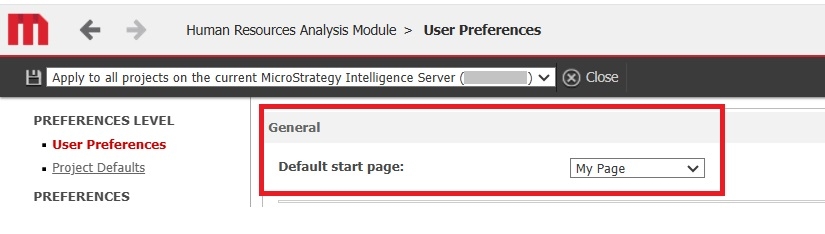
1.Set “My Page” as Default start page in the Web Preferences.
ka0PW0000003rNxYAI_0EMPW00000DfjGD.jpeg

 
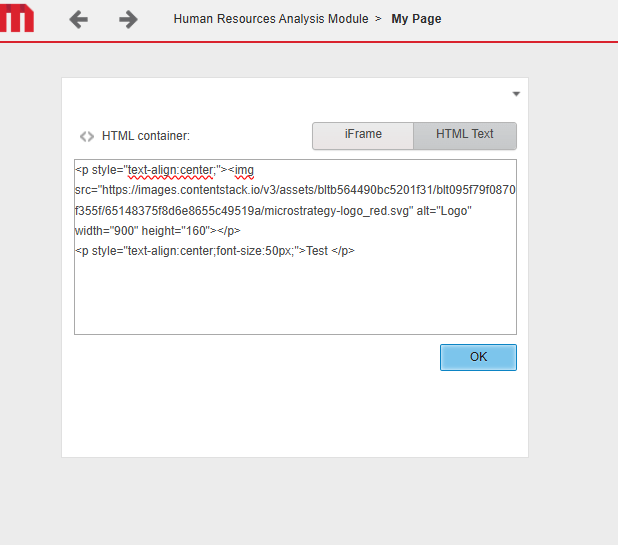
2. Create "My page" including an HTML container – e.g. with following content: 

<p style="text-align:center;"><img  src="https://images.contentstack.io/v3/assets/bltb564490bc5201f31/blt095f79f0870f355f/65148375f8d6e8655c49519a/Strategy-logo_red.svg" alt="Logo" width="900" height="160"></p>

<p style="text-align:center;font-size:50px;">Test </p>


3. Add “My Reports” or “Shared Reports” folder view and publish the layout.

ka0PW0000003rNxYAI_0EMPW00000DfjHp.jpeg

 
4. Navigate to a dashboard using one of the Folder widgets:

ka0PW0000003rNxYAI_0EMPW00000DfjJR.jpeg

 
5. Close the dashboard using the "x" button in the right-hand corner of the page - following message appears:
ka0PW0000003rNxYAI_0EMPW00000DfdE3.jpeg


Cause

This is an known issue in Strategy Web. The solution is currently under investigation. Please contact Strategy Support for an update on the fix.


Comment

0 comments

Details

Knowledge Article

Published:

November 26, 2024

Last Updated:

November 26, 2024