EducationSoftwareStrategy.com
StrategyCommunity

Knowledge Base

Product

Community

Knowledge Base

TopicsBrowse ArticlesDeveloper Zone

Product

Download SoftwareProduct DocumentationSecurity Hub

Education

Tutorial VideosSolution GalleryEducation courses

Community

GuidelinesGrandmastersEvents
x_social-icon_white.svglinkedin_social-icon_white.svg
Strategy logoCommunity

© Strategy Inc. All Rights Reserved.

LegalTerms of UsePrivacy Policy
  1. Home
  2. Topics

KB487047: How to remove export option from a Dashboard's visualization for a specific user or group


Sebastian Herrendorf

Senior Support Engineer • MicroStrategy


This Knowledgebase Article describes how to remove export option from a Dashboard's visualization for a specific user or group

Introduction

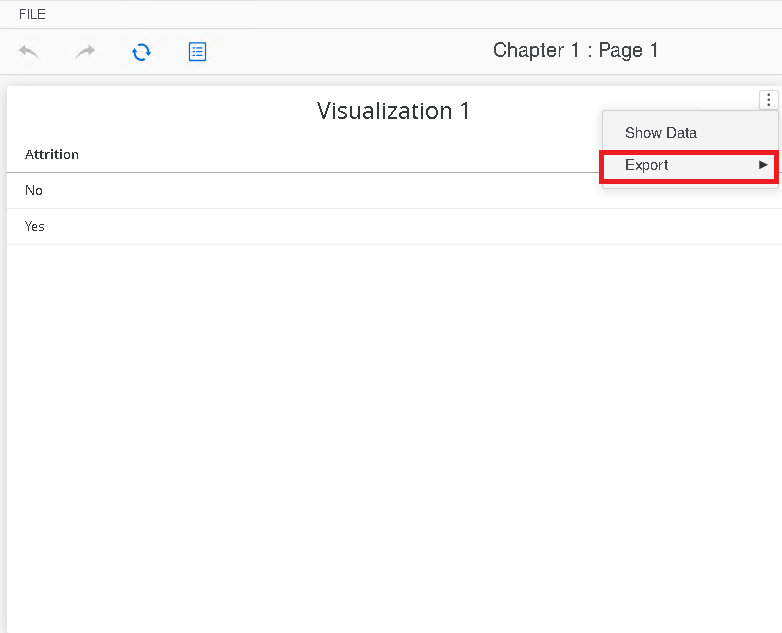
Below is an example of the option we intend to remove - export option available from the three dots menu on the right side of visualization.
ka0PW0000003w13YAA_0EMPW00000DuEs1.jpeg


Steps

To remove this feature for any given user our group, we need to remove the following privileges using Workstation.

  1. Log in to your environment using Workstation.
  2. Navigate to 'Users & Groups'
  3. Edit the privileges for the corresponding user/group
  4. Go to Privileges and uncheck the following four privileges:
    • Client - Reporter > Web export
    • Server - Reporter > Export to PDF
    • Server - Reporter > Export to HTML
    • Server - Reporter > Export to text
ka0PW0000003w13YAA_0EMPW00000DuFg1.jpeg

The end result will be no Export options show for the user as seen below.

ka0PW0000003w13YAA_0EMPW00000Du8TF.jpeg


Comment

0 comments

Details

Knowledge Article

Published:

December 4, 2024

Last Updated:

December 4, 2024