EducationSoftwareStrategy.com
StrategyCommunity

Knowledge Base

Product

Community

Knowledge Base

TopicsBrowse ArticlesDeveloper Zone

Product

Download SoftwareProduct DocumentationSecurity Hub

Education

Tutorial VideosSolution GalleryEducation courses

Community

GuidelinesGrandmastersEvents
x_social-icon_white.svglinkedin_social-icon_white.svg
Strategy logoCommunity

© Strategy Inc. All Rights Reserved.

LegalTerms of UsePrivacy Policy
  1. Home
  2. Topics

KB487054: Cannot Navigate to Pinned Dashboard by Tapping "View in tab" button


Shuai Xiong

Quality Engineer, Principal • MicroStrategy


The MicroStrategy for Office Teams App in the MicroStrategy ONE (December 2024) release encounters navigation issues for pinned dashboards.

Symptom and Steps to Reproduce

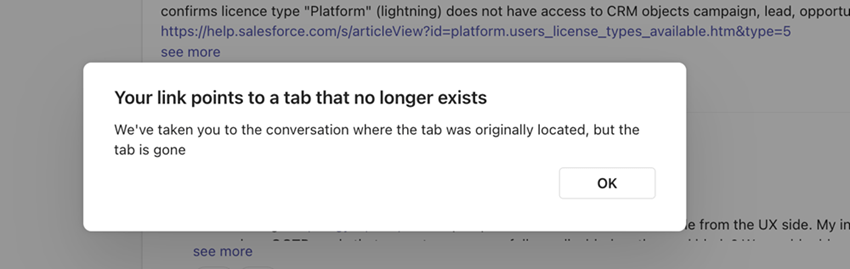
In the Strategy ONE (December 2024) Strategy for Office Teams App, you may encounter navigation issues for pinned dashboards when you click View in tab. You may encounter errors in the following locations:

  • Open a Teams channel before you pin a dashboard to the channel, click View in tab, and click the Posts tab.
  • Open a Teams channel under a team, pin a dashboard to another Teams channel under the same team, and click View in tab. 
    A 
    Your link points to a tab that no longer exists.
     error displays.

ka0PW00000040avYAA_0EMPW00000EcKc1.jpeg

Cause

A recent Microsoft update causes the issue. Strategy has reported the issue.

Workaround

Navigate to the pinned dashboard by selecting the appropriate Teams channel tab.


Comment

0 comments

Details

Knowledge Article

Published:

December 12, 2024

Last Updated:

December 13, 2024