Some subscriptions fail intermittently and at random. When users rerun these subscriptions, they often succeed after the initial failure. This inconsistency results in users not receiving their subscriptions on time and having to manually resend them.
Error message:
(QueryEngine encountered error: Connect failed. Query time-out. Error type: Odbc error. Odbc operation attempted: SQLDriverConnect. [HYT00:0: on SQLHANDLE] [Microsoft][ODBC SQL Server Driver]Login timeout expired [IM006:0: on SQLHANDLE] [Microsoft][ODBC Driver Manager] Driver's SQLSetConnectAttr failed. Error in Process method of Component: QueryEngineServer, Project DQ Reports, Job 13565, Error Code= -2147212544.)
[Database Classes][Error][UID:0][SID:0][OID:0][ConnectionKeeper.cpp:77] Connect failed. Query time-out. Error type: Odbc error. Odbc operation attempted: SQLDriverConnect. [HYT00:0: on SQLHANDLE] [Microsoft][ODBC SQL Server Driver]Login timeout expired [IM006:0: on SQLHANDLE][Database Classes][Error][UID:0][SID:0][OID:0][ConnectionWrapper.cpp:438] Failed to connect to data source. Error message: Connect failed. Query time-out.
The "Login timeout expired" error typically indicates that the connection attempt to the database server is timing out before a successful login can be established. This can occur due to network latency, server load, or misconfigured connection settings.
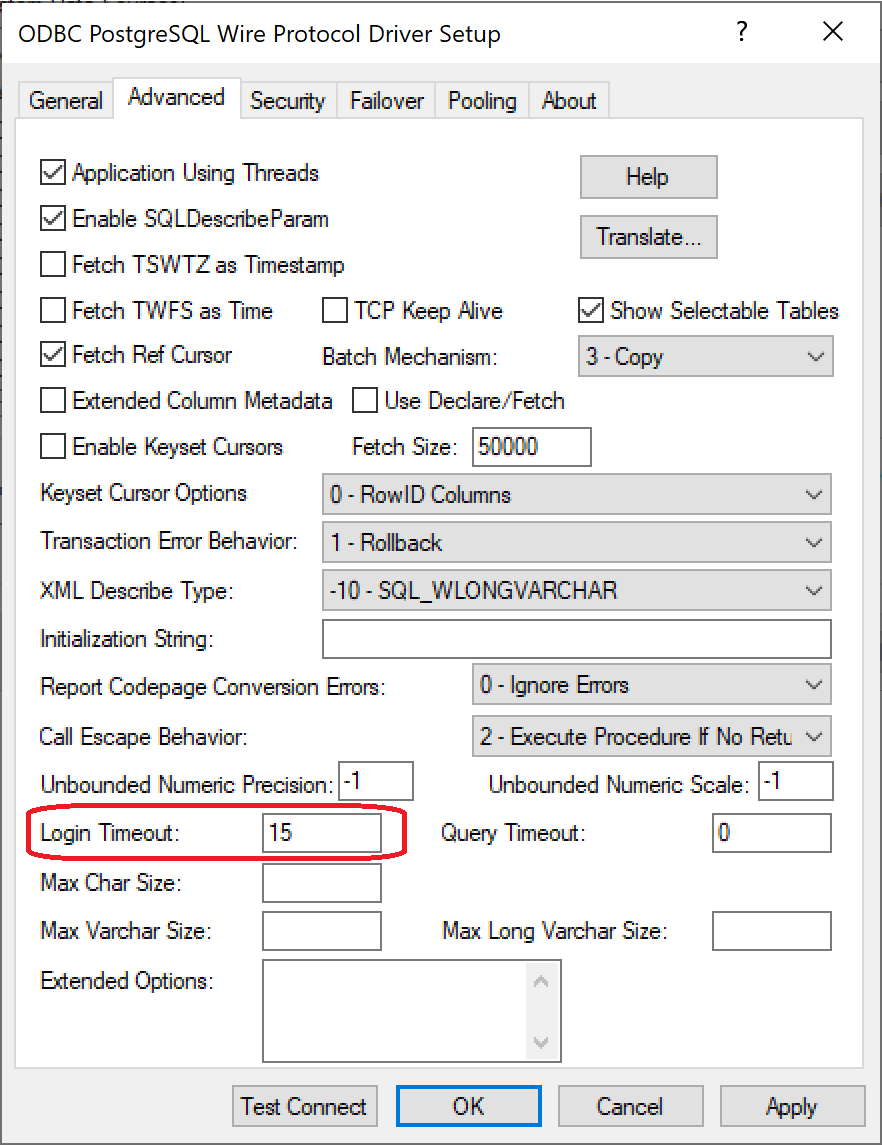
To mitigate the intermittent failures, one of the workaround is to increase the login timeout, which gives the connection attempt more time to succeed.
To increase the login timeout setting, please follow these steps: