EducationSoftwareStrategy.com
StrategyCommunity

Knowledge Base

Product

Community

Knowledge Base

TopicsBrowse ArticlesDeveloper Zone

Product

Download SoftwareProduct DocumentationSecurity Hub

Education

Tutorial VideosSolution GalleryEducation courses

Community

GuidelinesGrandmastersEvents
x_social-icon_white.svglinkedin_social-icon_white.svg
Strategy logoCommunity

© Strategy Inc. All Rights Reserved.

LegalTerms of UsePrivacy Policy
  1. Home
  2. Topics

KB487070: Expression-Based Transformation Defined on The Month Level does not apply when the report Filter is filtering by Day Level


Florencia Bertucci

Support Engineer • MicroStrategy


This article addresses an issue where an expression-based transformation defined on the month level does not apply correctly when a report filter is set at the day level. It explains how the transformation is intended to compare similar date ranges for previous months and describes the behavior observed when filtering data by day.

Introduction

 
An expression-based transformation defined on the month level does not apply correctly when the report contains a filter at the day level.
The transformation is intended to compare similar date ranges for the previous months. For example, June 1 through June 15 is compared to May 1 through May 15.  
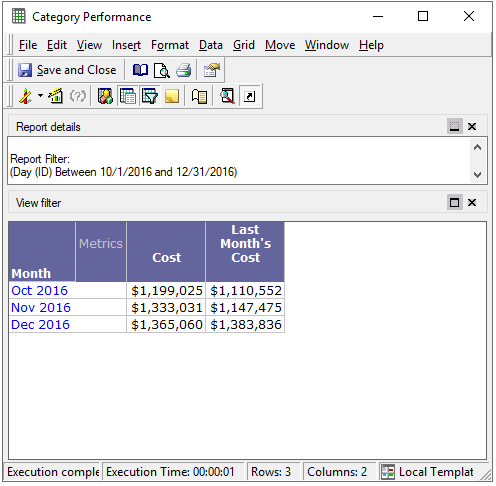


The report containing the transformation metric also includes a prompt that filters data at the day level. When filtering the report data at the day level, the filter gets ignored, and the transformation is applied at the month level independently of the prompt date selection. It only works when the month is specified in the filter explicitly.
 

Steps to reproduce


  1. Define a transformation at the monthly level using an expression-based transformation metric.
  2. Create a report that uses this transformation metric.
  3. Add a report filter that filters data at the day level.
  4. Observe that the transformation does not apply correctly when the day-level filter is used.


ka0PW0000004769YAA_0EMPW00000FMQ3H.jpeg

 
As it can be seen in the above image, data for October 2016 doesn't match with Last Month's data for November 2016.


Solution


The current transformation functionality is working as designed. If a transformation expression is configured to work on a monthly basis, and the report filter is set to a daily level, it's expected that the transformation may not align perfectly due to the different granularity levels.
A potential solution is to use a Many-to-Many Transformation that relies on an explicit transformation table rather than an expression. In this approach, one day is mapped to multiple days, such as mapping November 30th to both October 30th and October 31st. 
To create a table-based transformation, refer to Building a table-based transformation.


Comment

0 comments

Details

Knowledge Article

Published:

March 3, 2025

Last Updated:

March 3, 2025