This article outlines how to use the attached ACL Analyzer script to diagnose object-level ACLs (Access Control Lists) for multiple users or user groups in Strategy Workstation. The script evaluates group-based permissions and project-level privileges, generating a comprehensive access report. This report helps administrators quickly determine why a user may or may not have access to a given object, which can be either project-level or configuration-level.
The ACL Analyzer simplifies the process by automating the analysis of ACLs for multiple users or user groups, eliminating the need for manual checks. The script automatically accounts for the prioritization of ACLs and permissions, providing an accurate assessment without requiring administrators to manually interpret the order in which permissions are applied.
The object being analyzed can be of two types:
- Project-level objects: These are objects associated with a specific project, such as reports or cubes.
- Configuration-level objects: These are configuration-related objects that may have different access rules and privileges.
The script will automatically determine whether the object is Project-level or Configuration-level and adjust the ACL analysis accordingly.
The script requires the following parameters:
1. User ID: The ID of the user whose access to the object you want to analyze.
2. Object ID: The ID of the Strategy object to check.
3. Project ID: The ID of the project containing the object.
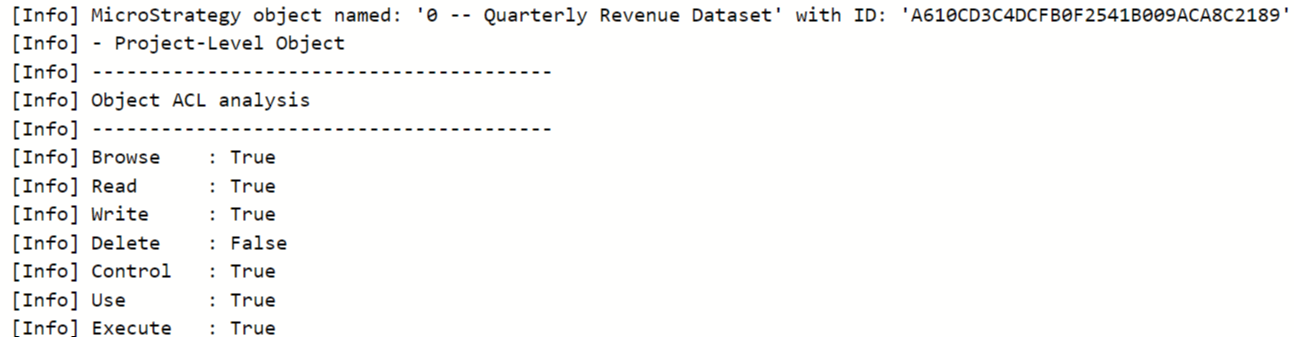
Once executed, the script analyzes the ACLs for all user groups associated with the specified user and outputs a diagnostic report that provides a final ACL for the object, considering group memberships and project-level privileges.
1. Download the Script
- Download the ACL Analyzer script (attached to this KB article).
- Save the script to a location where you can easily access it within Strategy Workstation.
2. Open the Script in Workstation
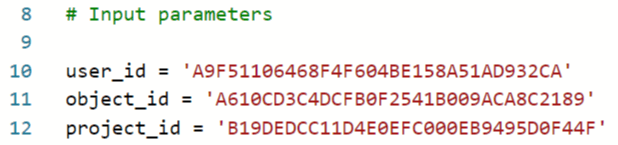
- Open the script in Strategy Workstation and input the required parameters in lines and 10, 11 and 12 (between single quotation marks):
- User ID: Enter the user’s ID whose access to the object you want to analyze.
- Object ID: Enter the ID of the object to check.
- Project ID: Enter the ID of the project containing the object.
Example:
3. Run the Script
- Execute the script. It will analyze the ACLs based on the user’s group memberships and any applicable project-level privileges which allow for bypassing object security access checks.
4. Review the Output
- Once the script completes execution, the diagnostic output will appear in the Workstation console.
Here is an example of the output generated by the script:
This customization is provided as a convenience to Strategy users and is only directly applicable to the version stated. While this code may apply to other releases directly, Strategy Technical Support makes no guarantees that the code provided will apply to any future or previous builds. In the event of a code change in future builds, Strategy Technical Support makes no guarantee that an updated version of this particular customization will be provided. For enhancements to this customization or to incorporate similar functionality into other versions, contact your Account Executive to inquire about Strategy Consulting assistance.
