The
UseNativeQueryparameter controls how SQL queries are processed by the driver. The default value is
2. When you set it to
1, the driver passes SQL queries to the database without transformation.
Use the parameter in the following methods:
UseNativeQuery=1;to the JDBC URL
UseNativeQuery=1;to Additional Connection String Parameters. For more information, see Create and Edit Data Sources.
UseNativeQuery=1 produces a 15-28% improvement in throughput across 1x and 10x using the current out-of-the-box setting.
See the following graph on throughput for each parameter:
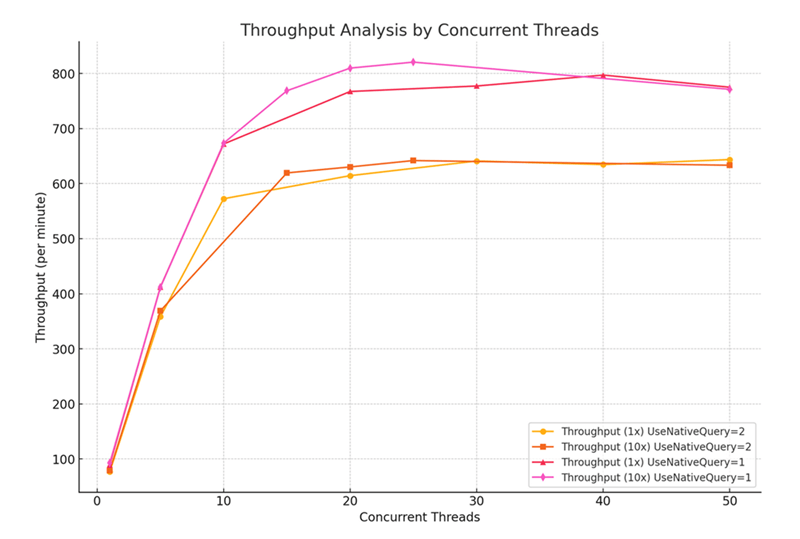
By enabling UseNativeQuery, the system directly sends the original SQL to the database without transforming or rewriting it. This parameter bypasses potential query syntax errors introduced by automated transformations, ensuring that complex or database-specific SQL statements execute as intended without compatibility issues. It is especially beneficial when you work with advanced queries that depend on native database functions or syntax.
This parameter can lead to certain behaviors and limitations, especially concerning queries with parameters and bulk operations.
The
UseNativeQuery=1parameter allows the driver to pass each insert operation directly to the database without batching them into a "INSERT INTO ... VALUES" statement. This can lead to performance issues, as each insert is processed individually.
EnableNativeParameterizedQuery=0while using
UseNativeQuery=1can resolve this issue. It ensures that bulk insert operations are preserved even when
UseNativeQuery=1is enabled.
Executing multiple statements in a single transaction using parameterized queries can be challenging when UseNativeQuery=1 is set. The driver passes each statement directly to the database without transformation, which may not support multiple statements in a single execution context, especially when parameters are involved.
The maximum number of parameters that can be used in a query is 256 parameters.
