EducationSoftwareStrategy.com
StrategyCommunity

Knowledge Base

Product

Community

Knowledge Base

TopicsBrowse ArticlesDeveloper Zone

Product

Download SoftwareProduct DocumentationSecurity Hub

Education

Tutorial VideosSolution GalleryEducation courses

Community

GuidelinesGrandmastersEvents
x_social-icon_white.svglinkedin_social-icon_white.svg
Strategy logoCommunity

© Strategy Inc. All Rights Reserved.

LegalTerms of UsePrivacy Policy
  1. Home
  2. Topics
  3. KB489385 - Monotype Fonts will no longer be bundled in the Strategy One platform starting in August 2025 release (25.08)

KB489385 - Monotype Fonts will no longer be bundled in the Strategy One platform starting in August 2025 release (25.08)


Frederick Kellerman

Cloud Support Expert I • MicroStrategy


This article discusses an upcoming change to the Strategy platform. Starting in August 2025 release monotype Fonts will no longer be bundled in the Strategy One platform.

Starting with the August 2025 release (25.08), Strategy One will no longer bundle Monotype licensed fonts. Instead, the platform will bundle 30 types of Google fonts. However, if any of the Monotype fonts are installed on the operating system of the computer or device used to render content, that font can still be used for your dashboards, reports, and documents.

What You Need to Know:

  • Existing content (such as dashboards) that uses Monotype licensed fonts will continue to work, provided the font exists in the operating system (Windows, macOS, etc.) on the viewing device. Most commonly used fonts are bundled with these systems by default.
  • In cases where the font does not exist in the operating system, it will be replaced on the fly with a similar font. Strategy One will use open-source Google Fonts, bundled with the platform, for this replacement.
  • PDF Exports: When exporting content to PDF, fonts will be replaced on the fly by similar alternatives because PDF generation occurs server-side, which may not include Monotype fonts by default.
  • Replacement fonts were selected to closely match the original fonts in appearance and characteristics—such as size, serif style, and font classification. While most users will find the differences subtle, some may notice minor changes in the text's appearance.
  • Symbol fonts (such as Windings) will be replaced with the default font (Open Sans) to let the administrator choose their best path forward.

Font Replacement Details:

Below is a list of Monotype licensed fonts that will no longer be bundled with the Strategy One platform, along with their corresponding replacement fonts:

Monotype Font

Replacement Font

Arial

Open Sans

Arial Black

Archivo Black

Arial Narrow

Roboto Condensed

Arial Unicode MS

Noto Sans

Batang

Noto Serif KR

Book Antiqua

Tinos

Bookman Old Style

Tinos

Bookshelf Symbol 1, 2, and 3

Open Sans

Comic Sans

Comic Neue

Courier New OS

Courier Prime

Garamond

EB Garamond

Haettenschweiler

Anton

Helvetica

Inter

Impact

Anton

Lucida Console

Roboto

Lucida Sans Unicode

Noto Sans

Marlett

Open Sans

Monotype Corsiva

Dancing Script

Monotype Sorts

Open Sans

MS Gothic

Noto Sans JP

Microsoft Sans Serif

Noto Sans

MT Extra

Open Sans

MS Outlook

Open Sans

Map Symbols

Open Sans

Symbol

Open Sans

Tahoma

Noto Sans

Times New Roman

Tinos

Trebuchet MS

Mulish

Verdana

Noto Sans

Webdings

Open Sans

Wingdings, 2, and 3

Open Sans

These replacement fonts were carefully selected to align with each font’s visual appearance, serif style, and classification.
Recommendations for Authors of Content:

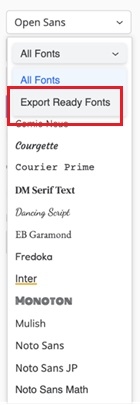
  1. If ensuring the exact appearance of fonts across all mediums (web, mobile, PDF) is critical, we recommend switching to one of the fonts labeled as “Export Ready” in the Strategy One font picker interface. 
ka0PW0000006ixdYAA_0EMPW00000SlO8P.jpeg
  •  
    These fonts are bundled with the platform and optimized for consistent display across environments. This change will be available starting on the August 2025 (25.08) release.
  • If you prefer to use Monotype licensed fonts and ensure their appearance remains intact during PDF export, the corresponding font files must be deployed after acquiring the necessary licenses.
  • Once a Monotype font has been deployed to the environment, that font will appear under the "Export Ready Fonts" menu. 
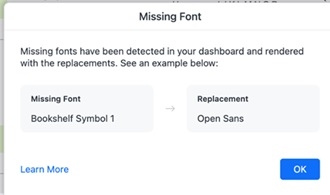
  • Any dashboard using a font that is not detected in the system, will display a warning message when entering edit mode.
     
ka0PW0000006ixdYAA_0EMPW00000SlOjV.jpeg
  •  
    "Missing fonts have been detected in your dashboard and rendered with the replacements."
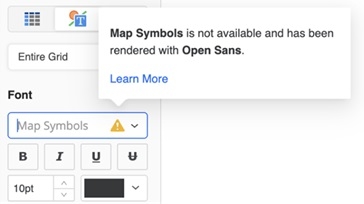
    The same font will appear in the font picker with the following warning:
ka0PW0000006ixdYAA_0EMPW00000Skm6P.jpeg
  •  
    "<font name> is not available and has been rendered with <replacement font name>"
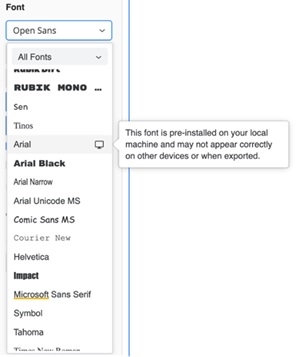
  • Any font that is not detected to be installed in the servers and is only detected on the authoring client machine will have this icon and tooltip:
ka0PW0000006ixdYAA_0EMPW00000SlPhB.jpeg
  •  
    "This font is pre-installed on your local machine and may not appear correctly on other devices or when exported."

FAQ: Changes to Font Bundling in Strategy One Platform

To ensure a smooth transition to the upcoming change in font handling on the Strategy One platform, we’ve compiled answers to frequently asked questions about this update.

  1. Why is this change being made?
    This change reflects our strategy to optimize long-term scalability and usability of the platform. By relying on system fonts and open-source replacements, we can minimize dependency on third-party licenses and provide greater flexibility to our customers.
  2.  How do I deploy a Monotype custom font to ensure its use across all platforms?
    If you prefer to continue using Monotype licensed fonts or other custom fonts, you must acquire the necessary licenses first.
    1. For Strategy Cloud customers, provide the font files to the Strategy Cloud team to deploy as custom fonts.
    2. For On-Prem customers, follow the steps from the following KB articles:
      1. Reports / RSDs
      2. Dashboards

      3. Update the font picker list in Web or Library
  3.  Do I need to take any action right now? For most customers, no immediate action is required. Existing fonts on your Strategy environment will be preserved during an in-place upgrade. 
  4. Will this change affect environments restored using MSTRBak?MSTRBak offers an option to include the fonts in the backup file that is not enabled by default.
    Enabling it will preserve the fonts.  
  5. Will this change impact Map visualizations?ESRI will not be impacted. For more information on how Mapbox visualizations are impacted, refer to this KB article: KB489393: Important Notice: Changes to Mapbox Label Fonts.
  6. Where can I get help or additional information?
    If you have any questions or need assistance, please don’t hesitate to reach out to our Support team through Auto Expert or the Community Case Portal.

Comment

0 comments

Details

Knowledge Article

Published:

July 25, 2025

Last Updated:

August 14, 2025