EducationSoftwareStrategy.com
StrategyCommunity

Knowledge Base

Product

Community

Knowledge Base

TopicsBrowse ArticlesDeveloper Zone

Product

Download SoftwareProduct DocumentationSecurity Hub

Education

Tutorial VideosSolution GalleryEducation courses

Community

GuidelinesGrandmastersEvents
x_social-icon_white.svglinkedin_social-icon_white.svg
Strategy logoCommunity

© Strategy Inc. All Rights Reserved.

LegalTerms of UsePrivacy Policy
  1. Home
  2. Topics

KB4895: How to create fact that does not get rounded up when calculated with MicroStrategy Developer 9.x-10.x and an Oracle Warehouse using the ApplySimple function.


Stefan Zepeda

Salesforce Solutions Architect • Strategy


How to create fact that does not get rounded up when calculated with MicroStrategy Developer 9.x-10.x and an Oracle Warehouse using the ApplySimple function.

If a fact in the warehouse has a value of 105.59, this will be rounded to 106 if the fact data is formatted to have no decimal places. Sometimes, it is desired to have just the numbers on the left of the decimal place and no rounding. (Therefore, the above fact would be 105).
 
While Strategy Developer 9.x-10.x does not have the inherent functionality to truncate numbers like this, it is possible to do it using the 'ApplySimple' function. The example given below relates to an Oracle data warehouse, but many other RDBMSs support similar functionality.
 
 
Create a new fact:
 

  • Right-click and select New > Fact
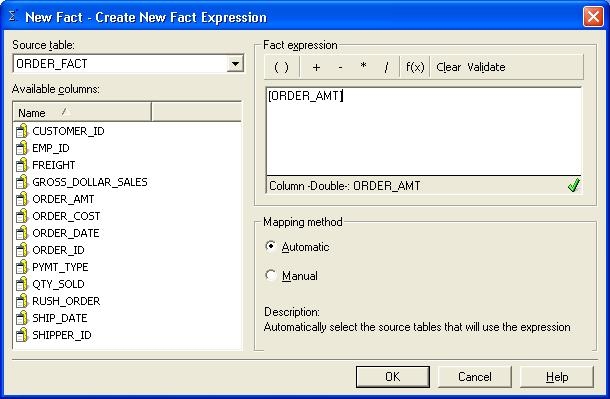
  • Select the fact column to be used, and drag over to the right window in the fact editor:
ka02R000000kcWwQAI_0EM440000002GGz.jpeg
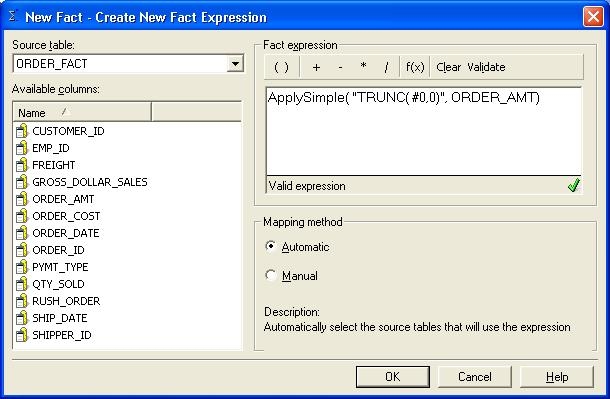
  • Modify the fact expression so that it uses the ApplySimple function to truncate the value to only return the digits to the left of the decimal point. The function takes the following format:
    ApplySimple("expression #0, #1, #2", col 1, col 2, col 3)
     
    the '#' symbol indicates where the warehouse column should be put in the expression. In this example, the fact expression would look like the following:
     

    ApplySimple("TRUNC( #,0,0)", order_amt)


ka02R000000kcWwQAI_0EM440000002GHB.jpeg
  • Click on OK.
  • Click on Save and Close.
  • From the schema menu, click on 'update schema".


Users can now use this fact in metric calculations.


Comment

0 comments

Details

Knowledge Article

Published:

April 14, 2017

Last Updated:

April 14, 2017