EducationSoftwareStrategy.com
StrategyCommunity

Knowledge Base

Product

Community

Knowledge Base

TopicsBrowse ArticlesDeveloper Zone

Product

Download SoftwareProduct DocumentationSecurity Hub

Education

Tutorial VideosSolution GalleryEducation courses

Community

GuidelinesGrandmastersEvents
x_social-icon_white.svglinkedin_social-icon_white.svg
Strategy logoCommunity

© Strategy Inc. All Rights Reserved.

LegalTerms of UsePrivacy Policy
  1. Home
  2. Topics

KB489550: Add Functionality with a Custom Scene Delegate for Strategy Library iOS


Mengyuan Guan

Product Owner, Principal • MicroStrategy


Starting with iOS 13, Apple moved to a scene-based architecture, where each scene represents a distinct instance of the app’s UI and is managed independently. To align with these modern app architectures, our SDK now supports the new UISceneDelegate API. The Strategy iOS Library SDK is preconfigured with an internal scene delegate class but developers can customize behavior by providing their own delegate.

Starting with iOS 13, Apple introduced the

 UIScene
and
UISceneDelegate
APIs as part of a significant update to the application lifecycle model. Previously, all state transitions were managed exclusively through
UIApplicationDelegate
at the app level. With multi-window support on iPad and enhanced lifecycle management on iPhone, Apple moved to a scene-based architecture, where each scene represents a distinct instance of the app’s UI and is managed independently.

To align with these modern app architectures, our SDK now supports

UISceneDelegate
.

The template Xcode project included in the Strategy iOS Library SDK is preconfigured with an internal scene delegate class named 

DossierDefaultSceneDelegate.
However, developers can customize behavior by providing their own delegate. This is typically done by extending the internal scene delegate class and overriding relevant methods defined in the
UIWindowSceneDelegate 
protocol to add functionality during app launch and state transitions.

Create a Custom Scene Delegate Class that extends DossierDefaultDelegate

  • Set up the environment to use the Library Mobile for iOS project. Use this project as the basis for your customizations. 
  • Open the template project and use Xcode to open the
    StrategyLibrary.xcodeproj
    file.
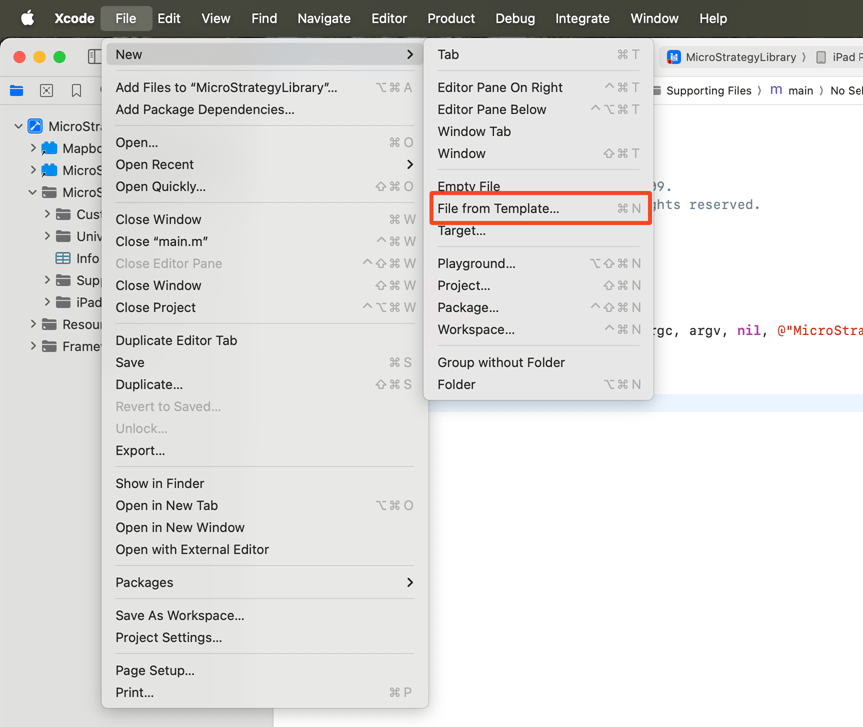
  • Create a new Swift file. From the File menu, point to New, then select File from Template, and choose the Swift file type. Provide a meaningful name, such as
    CustomSceneDelegate.

ka0PY000000KCmbYAG_0EMPY00000QH5Vm.jpeg
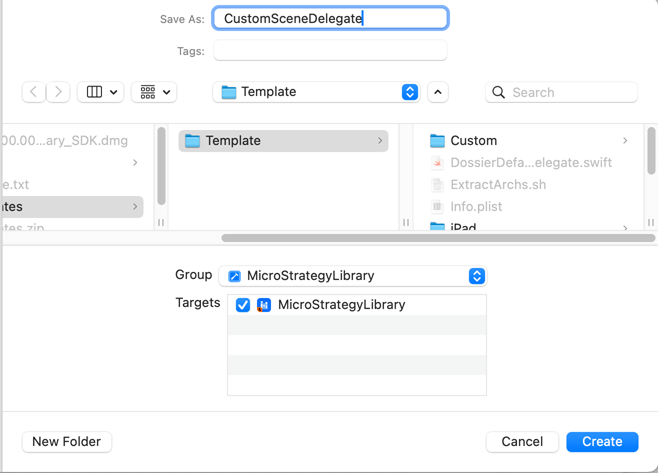
  • Select Swift File. Input
    CustomSceneDelegate.

ka0PY000000KCmbYAG_0EMPY00000QHNXV.jpeg
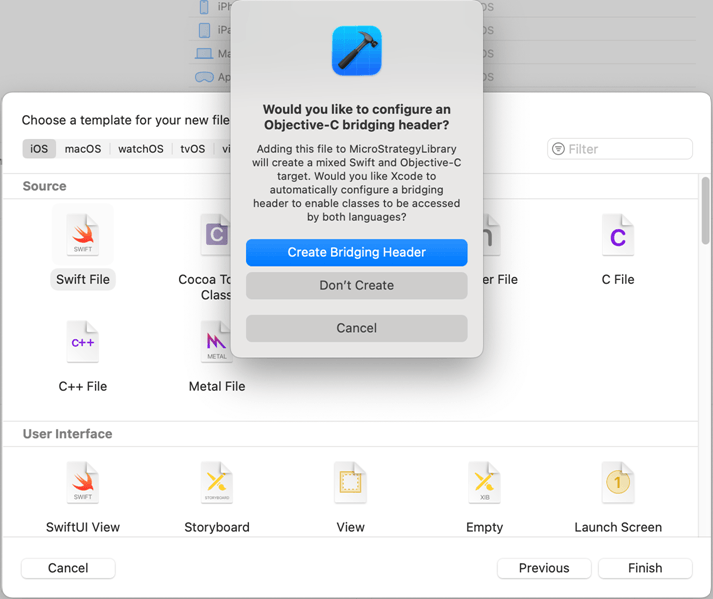
  • Click Create Bridging Header.
     
ka0PY000000KCmbYAG_0EMPY00000QHMd4.jpeg
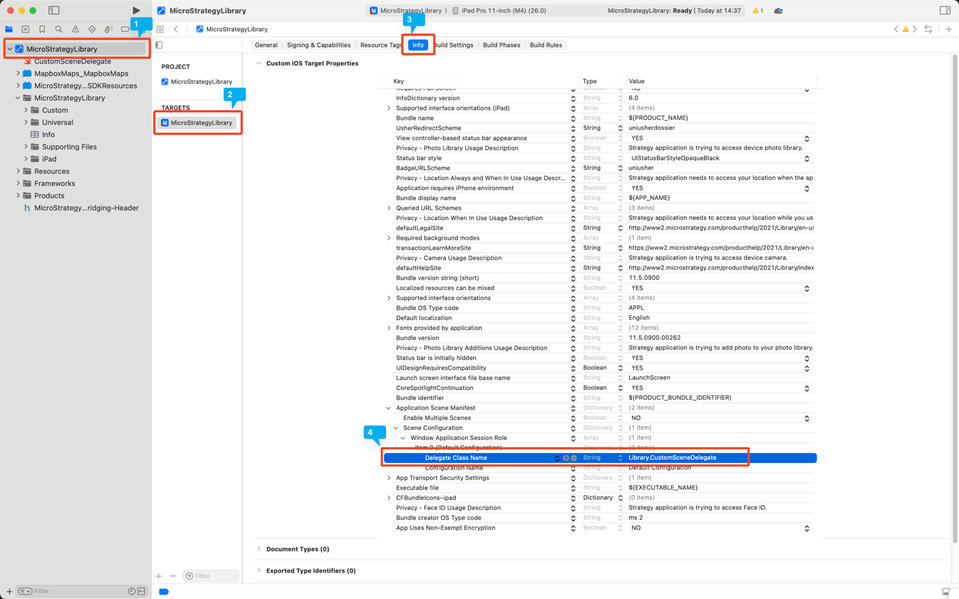
  • Navigate to StrategyLibrary > StrategyLibrary > Info. Find Application Scene Manifest > Scene Configuration > Window Application Session Role > Item 0 > Delegate Class Name. Change its value to Library.CustomSceneDelegate.
ka0PY000000KCmbYAG_0EMPY00000QHQyP.jpeg

Implement and Use CustomSceneDelegate

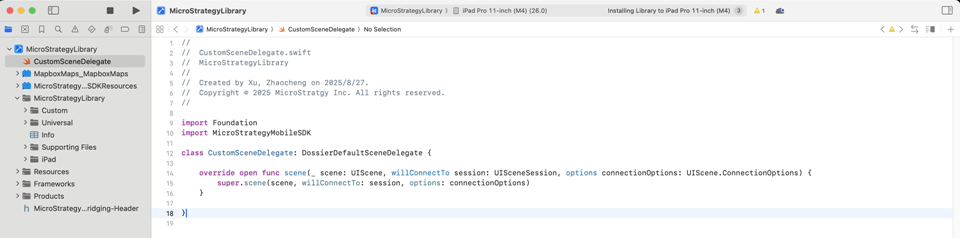
  • Modify the new Swift file. Import the StrategyLibraryMobileSDK module.
  • Define a class extended from
    DossierDefaultSceneDelegate 
    and provide implemented functions for
    UIWindowSceneDelegate 
    as necessary.
  • Call super implementation to avoid missing important features provided in the Strategy Library SDK, as shown in line 15 in the screenshot below.
ka0PY000000KCmbYAG_0EMPY00000QHTOP.jpeg
  • Build and run your application.


Comment

0 comments

Details

Knowledge Article

Published:

November 6, 2025

Last Updated:

November 14, 2025