Every iOS application has a delegate object that conforms to the
UIApplicationDelegateprotocol. This app delegate object is mainly responsible for tracking the state transitions the application goes through while it is running. The app delegate of an application is defined in the Xcode project configuration and is instantiated by iOS when the application launches. See the iOS Developer Library for more information about the
UIApplicationDelegateprotocol.
The StrategyMobile Xcode project is preconfigured with its own internal app delegate class (called
MSIAppDelegateImpl), but it is possible to configure a custom app delegate class that adds functionality when the application launches and when state transitions occur. Do this by extending the StrategyMobile internal app delegate class and overriding the different methods defined in the
UIApplicationDelegateprotocol.
MISAppDelegateImpl:
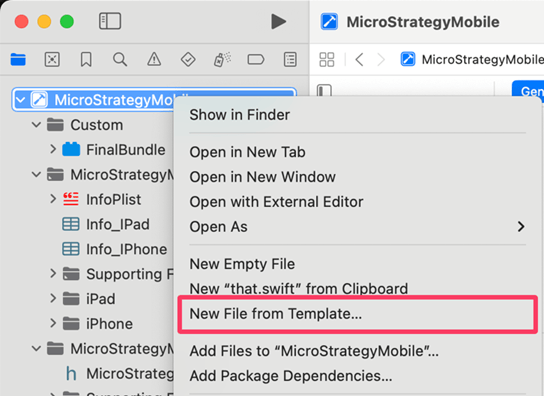
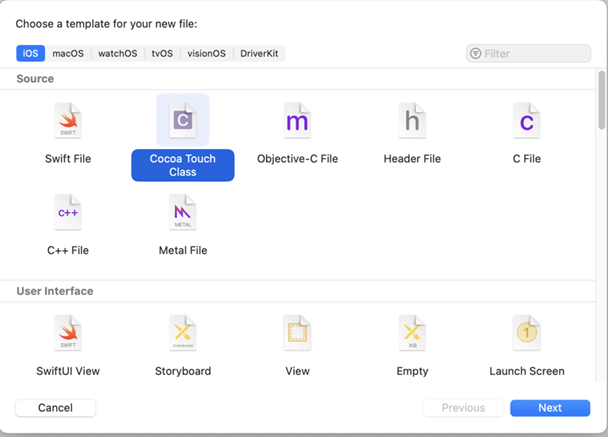
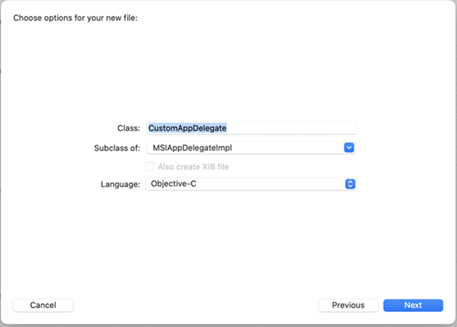
CustomAppDelegate). Enter
MSIAppDelegateImplas the parent class. Select Objective-C as the language. Click Next.
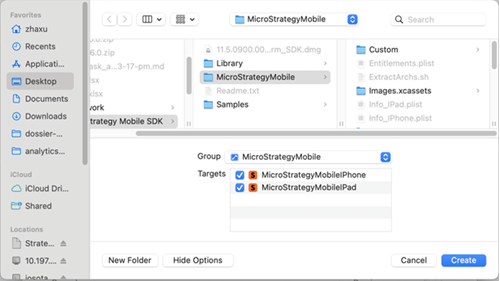
StrategyMobileand that both
StrategyMobileIPhoneand
StrategyMobileIPadare selected as Targets. Click Create.
#import <StrategyMobileSDK/MSIAppDelegateImpl.h>
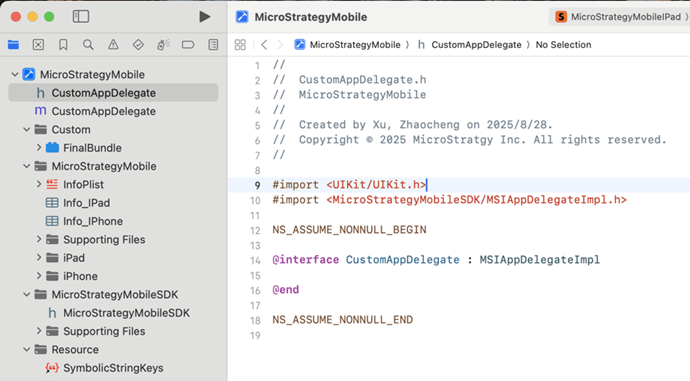
- (BOOL)application:(UIApplication *)application didFinishLaunchingWithOptions:(NSDictionary *)launchOptions NS_AVAILABLE_IOS(3_0) {
    return [super application:application didFinishLaunchingWithOptions:launchOptions];
}main.m. Replace
MSIAppDelegateIMPlwith your app delegate class name (such as
CustomAppDelegate).
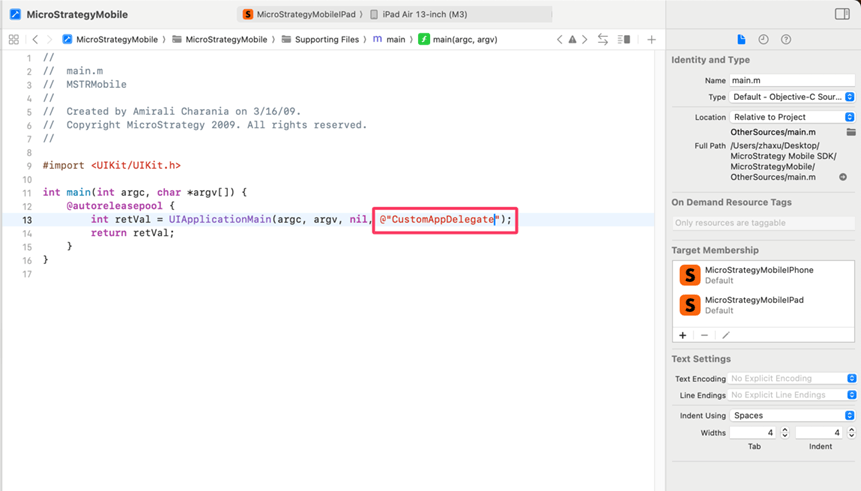
MainWindow.xiband
MainWindow-iPad.xibhave been deprecated.
MSIDefaultSceneDelegateor registering relevant event listeners as needed.
MethodApple Doc Link - (void) applicationDidBecomeActive:(UIApplication *) application;applicationDidBecomeActive: - (void) applicationWillResignActive:(UIApplication *) application;applicationWillResignActive: - (void) applicationDidEnterBackground:(UIApplication *) application;applicationDidEnterBackground: - (void) applicationWillEnterForeground:(UIApplication *) application;applicationWillEnterForeground: | MethodApple Doc Link - (void) applicationDidBecomeActive:(UIApplication *) application;applicationDidBecomeActive: - (void) applicationWillResignActive:(UIApplication *) application;applicationWillResignActive: - (void) applicationDidEnterBackground:(UIApplication *) application;applicationDidEnterBackground: - (void) applicationWillEnterForeground:(UIApplication *) application;applicationWillEnterForeground: |
MethodApple Doc Link - (void) applicationDidBecomeActive:(UIApplication *) application;applicationDidBecomeActive: - (void) applicationWillResignActive:(UIApplication *) application;applicationWillResignActive: - (void) applicationDidEnterBackground:(UIApplication *) application;applicationDidEnterBackground: - (void) applicationWillEnterForeground:(UIApplication *) application;applicationWillEnterForeground: | MethodApple Doc Link - (void) applicationDidBecomeActive:(UIApplication *) application;applicationDidBecomeActive: - (void) applicationWillResignActive:(UIApplication *) application;applicationWillResignActive: - (void) applicationDidEnterBackground:(UIApplication *) application;applicationDidEnterBackground: - (void) applicationWillEnterForeground:(UIApplication *) application;applicationWillEnterForeground: |
MethodApple Doc Link - (void) applicationDidBecomeActive:(UIApplication *) application;applicationDidBecomeActive: - (void) applicationWillResignActive:(UIApplication *) application;applicationWillResignActive: - (void) applicationDidEnterBackground:(UIApplication *) application;applicationDidEnterBackground: - (void) applicationWillEnterForeground:(UIApplication *) application;applicationWillEnterForeground: | MethodApple Doc Link - (void) applicationDidBecomeActive:(UIApplication *) application;applicationDidBecomeActive: - (void) applicationWillResignActive:(UIApplication *) application;applicationWillResignActive: - (void) applicationDidEnterBackground:(UIApplication *) application;applicationDidEnterBackground: - (void) applicationWillEnterForeground:(UIApplication *) application;applicationWillEnterForeground: |
MethodApple Doc Link - (void) applicationDidBecomeActive:(UIApplication *) application;applicationDidBecomeActive: - (void) applicationWillResignActive:(UIApplication *) application;applicationWillResignActive: - (void) applicationDidEnterBackground:(UIApplication *) application;applicationDidEnterBackground: - (void) applicationWillEnterForeground:(UIApplication *) application;applicationWillEnterForeground: | MethodApple Doc Link - (void) applicationDidBecomeActive:(UIApplication *) application;applicationDidBecomeActive: - (void) applicationWillResignActive:(UIApplication *) application;applicationWillResignActive: - (void) applicationDidEnterBackground:(UIApplication *) application;applicationDidEnterBackground: - (void) applicationWillEnterForeground:(UIApplication *) application;applicationWillEnterForeground: |
MethodApple Doc Link - (void) applicationDidBecomeActive:(UIApplication *) application;applicationDidBecomeActive: - (void) applicationWillResignActive:(UIApplication *) application;applicationWillResignActive: - (void) applicationDidEnterBackground:(UIApplication *) application;applicationDidEnterBackground: - (void) applicationWillEnterForeground:(UIApplication *) application;applicationWillEnterForeground: | MethodApple Doc Link - (void) applicationDidBecomeActive:(UIApplication *) application;applicationDidBecomeActive: - (void) applicationWillResignActive:(UIApplication *) application;applicationWillResignActive: - (void) applicationDidEnterBackground:(UIApplication *) application;applicationDidEnterBackground: - (void) applicationWillEnterForeground:(UIApplication *) application;applicationWillEnterForeground: |
