EducationSoftwareStrategy.com
StrategyCommunity

Knowledge Base

Product

Community

Knowledge Base

TopicsBrowse ArticlesDeveloper Zone

Product

Download SoftwareProduct DocumentationSecurity Hub

Education

Tutorial VideosSolution GalleryEducation courses

Community

GuidelinesGrandmastersEvents
x_social-icon_white.svglinkedin_social-icon_white.svg
Strategy logoCommunity

© Strategy Inc. All Rights Reserved.

LegalTerms of UsePrivacy Policy
  1. Home
  2. Topics

KB4923: Unable to drill anywhere in report for MicroStrategy Developer 9.4.1 and 10.x.


Stefan Zepeda

Salesforce Solutions Architect • Strategy


SYMPTOM:
In Strategy Developer 9.4.1 and 10.x, when drilling options are shown in a grid, only drilling down is allowed:
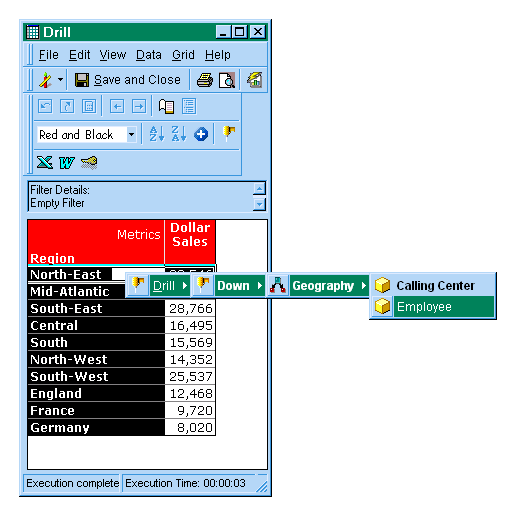
ka02R000000kch1QAA_0EM440000002GH8.gif

CAUSE:
There are two causes for this issue:

  1. This report was configured to only show the drill down option.
  2. This project was configured to only show the drill down option.

ACTION:

  • To enable the drill anywhere feature at the report level, users should follow the steps below:
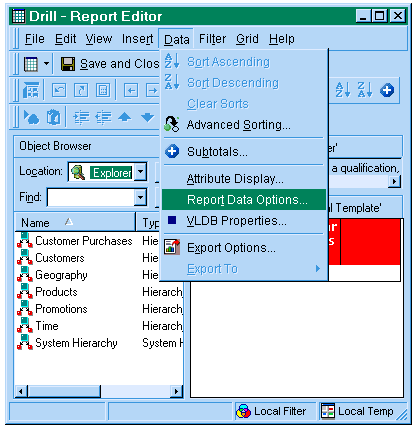
    • Open the Report in the Report Editor, go to the Data menu and select Report Data Options:
ka02R000000kch1QAA_0EM440000002GH7.gif
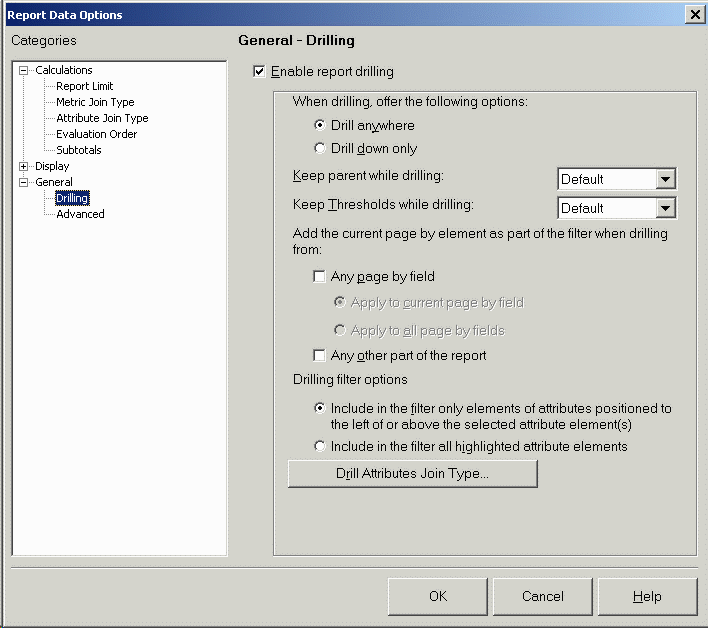
    • Select the Drilling Tab, enable the 'Drill Anywhere' option and click on the OK button:
ka02R000000kch1QAA_0EM440000002GHI.gif
    • Click on the 'Save and Close' button of the Report Editor.
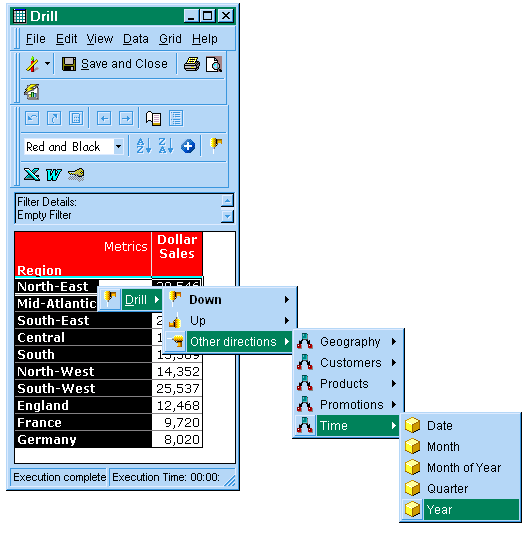
    • Run the report again and note that drill anywhere is allowed:
ka02R000000kch1QAA_0EM440000002GHA.gif
  • To enable the drill anywhere feature at the project level, users should follow the steps below:
    • In Strategy Desktop, select the project, right-click and select 'My Preferences'.
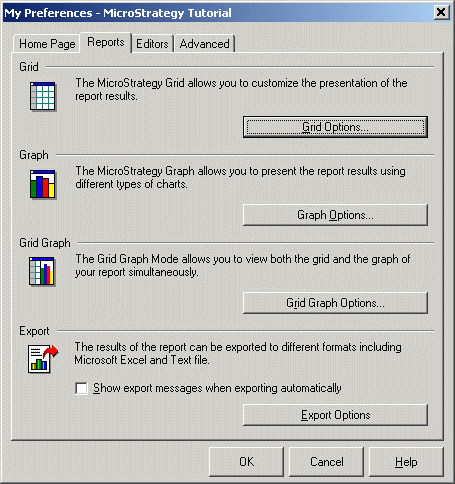
    • The My Preferences window appears, please select the 'Reports' tab and click on the 'Grid Options' button:
ka02R000000kch1QAA_0EM440000002GHH.gif
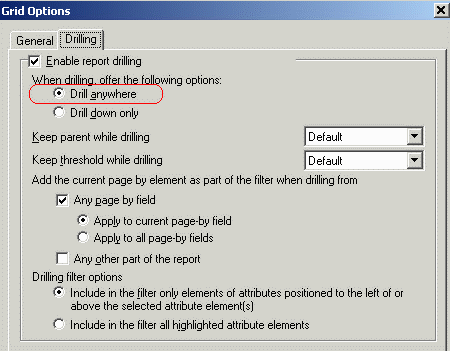
    • The 'Grid Options' window appears, select the 'Drilling' tab, enable 'Drill anywhere' and select 'OK':
ka02R000000kch1QAA_0EM440000002GHG.gif

 
NOTE: Only the reports created after this change have the 'Drill anywhere option'. Reports that were created before this change should be changed manually at report level to see the drill anywhere option. In Strategy Developer 9.4.1 and later, the Find and Replace dialog can be launched from the Tools menu to update the setting for existing reports in bulk.


Comment

0 comments

Details

Knowledge Article

Published:

April 4, 2017

Last Updated:

April 4, 2017