What is a cartesian join?
EXAMPLE:
LU_COUNTRY | |
COUNTRY_ID | COUNTRY_NAME |
1 | USA |
2 | Mexico |
3 | Sweden |
LU_REGION | ||
REGION_ID | REGION_NAME | COUNTRY_ID |
1 | North-East | 1 |
2 | Central | 1 |
3 | South | 1 |
4 | Sweden | 3 |
5 | France | 4 |
The following query (cartesian join):
SELECT *
FROM LU_COUNTRY,
LU_REGION
generates a cartesian product:
COUNTRY_ID | COUNTRY_NAME | REGION_ID | REGION_NAME | COUNTRY_ID |
1 | USA | 1 | North-East | 1 |
1 | USA | 2 | Central | 1 |
1 | USA | 3 | South | 1 |
1 | USA | 4 | Sweden | 3 |
1 | USA | 5 | France | 4 |
2 | Mexico | 1 | North-East | 1 |
2 | Mexico | 2 | Central | 1 |
2 | Mexico | 3 | South | 1 |
2 | Mexico | 4 | Sweden | 3 |
2 | Mexico | 5 | France | 4 |
3 | Sweden | 1 | North-East | 1 |
3 | Sweden | 2 | Central | 1 |
3 | Sweden | 3 | South | 1 |
3 | Sweden | 4 | Sweden | 3 |
3 | Sweden | 5 | France | 4 |
What is an equi-join?
EXAMPLE:Given the tables from the previous bullet and adding a where clause to the existing query, users create an equi-join:
SELECT *
FROM LU_COUNTRY,
LU_REGION
WHERE LU_COUNTRY.COUNTRY_ID = LU_REGION.COUNTRY_ID
and they return (inner join):
COUNTRY_ID | COUNTRY_NAME | REGION_ID | REGION_NAME | COUNTRY_ID |
1 | USA | 1 | North-East | 1 |
1 | USA | 2 | Central | 1 |
1 | USA | 3 | South | 1 |
3 | Sweden | 4 | Sweden | 3 |
The same query in SQL 92 is:
SELECT *
FROM LU_COUNTRY
JOIN LU_REGION
ON (LU_COUNTRY.COUNTRY_ID = LU_REGION.COUNTRY_ID)
Is a cartesian join the same as a cross join?
EXAMPLE:
SQL 89 | SQL 92 |
SELECT * | SELECT * |
Both these queries return the same result (shown above) but they are written following different standards.
Under what circumstances does the MicroStrategy Engine generate a cartesian join?
Case 1:
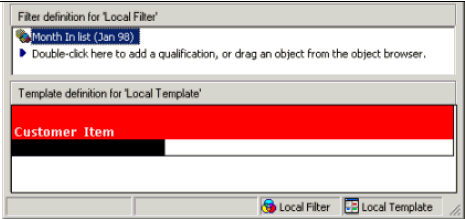
A cartesian join is generated between the LU_CUSTOMER and the LU_ITEM table since there is no fact table that relates these attributes.
The filter on date is ignored.
select a11.CUSTOMER_ID CUSTOMER_ID,
a11.CUST_FIRST_NAME CUST_FIRST_NAME,
a12.ITEM_ID ITEM_ID,
a12.ITEM_NAME ITEM_NAME
from LU_CUSTOMER a11
cross join LU_ITEM a12
Case 2:
Filtering on an attribute unrelated to the fact.
Example 2: Item and Unit Cost filtering on Customer
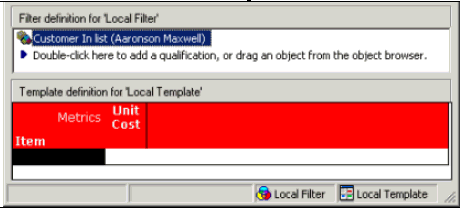
A cartesian join is generated between the LU_CUSTOMER and the other tables since the fact UNIT_COST does not exist at the Customer level or any of its descendants.
This behavior occurs also with Security Filters.
select a11.ITEM_ID ITEM_ID,
max(a13.ITEM_NAME) ITEM_NAME,
sum(a11.UNIT_COST) UNITCOST
from PRODUCT_DETAIL a11
cross join LU_CUSTOMER a12
join LU_ITEM a13
on (a11.ITEM_ID = a13.ITEM_ID)
where a12.CUSTOMER_ID in (1)
group by a11.ITEM_ID
Other cases that do not generate cartesian joins but worth considering:
Case 3:
Attribute on the template unrelated to the metric on the template.
Example 3: Customer and Unit Cost filtering on Month
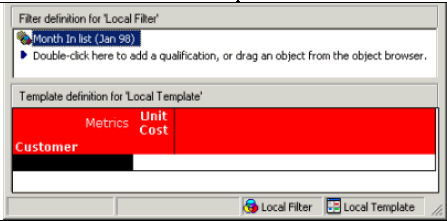
In this case, there is no way to relate the Customer attribute and the fact UNIT_COST because it doesn't exist at the Customer level or any of it's descendants.
SQL is not generated.
Status: Execution failed
Error: Unable to Start Execution
Starting Time: 18:41:31
SQLEngine got an Exception from DFC: Engine Logic:
Fact does not exist at a level that can support the requested analysis.
Case 4:
Attribute on the template filtering on an unrelated attribute.
Example 4: Customer filtering on Customer and Month
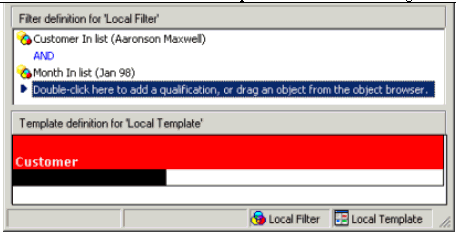
A common situation of ignored filters appears when one filter on one attribute is applied to another attribute extraneous to the first hierarchy.
Month is an attribute unrelated to Customer, so the 'Month In list (Jan 98)' part of the filter is ignored in the WHERE clause of the query.
select a11.CUSTOMER_ID CUSTOMER_ID,
a11.CUST_LAST_NAME CUST_LAST_NAME,
a11.CUST_FIRST_NAME CUST_FIRST_NAME
from LU_CUSTOMER a11
where a11.CUSTOMER_ID in (1)
Does the Cartesian Join Warning VLDB property avoid the Engine to generate cartesian joins?
Can the Cartesian Join Warning VLDB property be customized to show a different error message?
How can users avoid cartesian joins?
Case 1 can be solved by:
Example 5: Customer, Item and Unit Sales filtering on Month
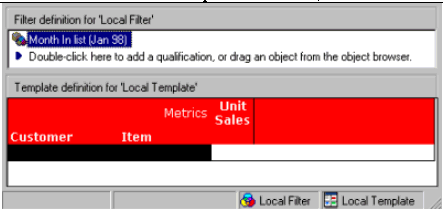
The Unit Sales metric provides to the MicroStrategy Engine a table that it can use to relate the two attributes, since the QTY_SOLD fact exists at the order (child of customer), date (child of month) and item level in the ORDER_DETAIL table.
In the SQL, the Engine chose the ORDER_DETAIL table and applied the month filter, returning a list of customers, items and units sold. Also users can see that the MicroStrategy Engine found the path to join all the tables needed to relate the two attributes via the fact table.
select a11.ITEM_ID ITEM_ID,
max(a15.ITEM_NAME) ITEM_NAME,
a12.CUSTOMER_ID CUSTOMER_ID,
max(a14.CUST_LAST_NAME) CUST_LAST_NAME,
max(a14.CUST_FIRST_NAME) CUST_FIRST_NAME,
sum(a11.QTY_SOLD) UNITSALES
from ORDER_DETAIL a11,
LU_ORDER a12,
LU_DATE a13,
LU_CUSTOMER a14,
LU_ITEM a15
where a11.ORDER_ID = a12.ORDER_ID and
a11.ORDER_DATE = a13.DATE_ID and
a12.CUSTOMER_ID = a14.CUSTOMER_ID and
a11.ITEM_ID = a15.ITEM_ID
and a13.MONTH_ID in (199801)
group by a11.ITEM_ID,
a12.CUSTOMER_ID
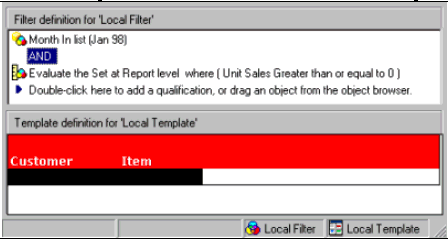
This is a similar approach to the one shown above. The Unit Sales metric provides to the MicroStrategy Engine a table that it can use to relate the two attributes, since the QTY_SOLD fact exists at the order (child of customer), date (child of month) and item level in the ORDER_DETAIL table.
The 'dummy filter' is defined as Unit Sales greater than or equal to '0'. Because it is known that in the warehouse there are no negative values for the sales, so the condition is always be true.
In the SQL, the approach is similar to the one used by a relationship filter. A temporary table is created with the keys that is needed from the fact table, so the relationship is created. The 'dummy filter' is performed using a HAVING clause.
In the second pass, a join against the temporary table is performed and the correct results are being returned.
select a12.CUSTOMER_ID CUSTOMER_ID,
a11.ITEM_ID ITEM_ID
into #ZZTIL00MJNXMQ000
from ORDER_DETAIL a11,
LU_ORDER a12,
LU_DATE a13
where a11.ORDER_ID = a12.ORDER_ID and
a11.ORDER_DATE = a13.DATE_ID
and a13.MONTH_ID in (199801)
group by a12.CUSTOMER_ID,
a11.ITEM_ID
having sum(a11.QTY_SOLD) >= 0
select pa1.CUSTOMER_ID CUSTOMER_ID,
a11.CUST_LAST_NAME CUST_LAST_NAME,
a11.CUST_FIRST_NAME CUST_FIRST_NAME,
pa1.ITEM_ID ITEM_ID,
a12.ITEM_NAME ITEM_NAME
from #ZZTIL00MJNXMQ000 pa1,
LU_CUSTOMER a11,
LU_ITEM a12
where pa1.CUSTOMER_ID = a11.CUSTOMER_ID and
pa1.ITEM_ID = a12.ITEM_ID
<[Dollar Sales] ; month@id = 199801> {customer, item}
Example 7: Customer and Item filtering on Month (relationship filter)
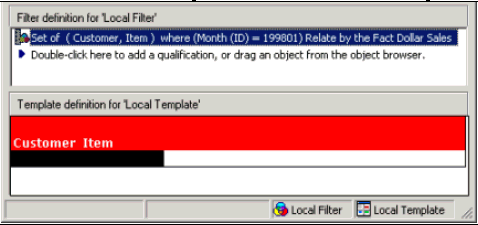
This is the 'cleanest' way of establishing the relationship between the two attributes by using MicroStrategy's built-in functionality for this type of reports. The relationship filter instructs the MicroStrategy Engine to use the best fact's table to relate Customer and Item, and to filter on Month.
The first pass shows that the Engine chose the ORDER_DETAIL table and applied the month filter, returning a list of customers and items.
The second pass just joins the first temporary table to the respective lookup tables to get the description of the requested attributes.
select distinct r12.CUSTOMER_ID CUSTOMER_ID,
r11.ITEM_ID ITEM_ID
into ZZRF00
from ORDER_DETAIL r11,
LU_ORDER r12,
LU_DATE r13
where r11.ORDER_ID = r12.ORDER_ID and
r11.ORDER_DATE = r13.DATE_ID
and r13.MONTH_ID = 199801
select pa1.CUSTOMER_ID CUSTOMER_ID,
a11.CUST_FIRST_NAME CUST_FIRST_NAME,
pa1.ITEM_ID ITEM_ID,
a12.ITEM_NAME ITEM_NAME
from ZZRF00 pa1,
LU_CUSTOMER a11,
LU_ITEM a12
where pa1.CUSTOMER_ID = a11.CUSTOMER_ID and
pa1.ITEM_ID = a12.ITEM_ID
Example 8: Item and Unit Cost (modified) filtering on Customer
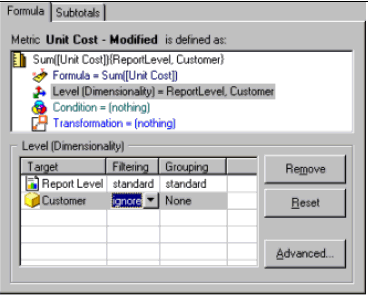
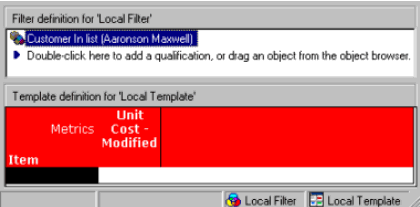
By adding 'Customer' to the metric dimensionality, filtering = 'ignore' and grouping = 'none', the MicroStrategy Engine is instructed not to group by 'Customer' and to ignore any filter related to it.
In the SQL, users can see that the filter on customer is ignored and no cartesian join is performed against the unrelated attribute (Customer).
select a11.ITEM_ID ITEM_ID,
max(a12.ITEM_NAME) ITEM_NAME,
sum(a11.UNIT_COST) UNITCOSTMODI
from PRODUCT_DETAIL a11
join LU_ITEM a12
on (a11.ITEM_ID = a12.ITEM_ID)
group by a11.ITEM_ID
