EducationSoftwareStrategy.com
StrategyCommunity

Knowledge Base

Product

Community

Knowledge Base

TopicsBrowse ArticlesDeveloper Zone

Product

Download SoftwareProduct DocumentationSecurity Hub

Education

Tutorial VideosSolution GalleryEducation courses

Community

GuidelinesGrandmastersEvents
x_social-icon_white.svglinkedin_social-icon_white.svg
Strategy logoCommunity

© Strategy Inc. All Rights Reserved.

LegalTerms of UsePrivacy Policy
  1. Home
  2. Topics

KB5096: How to make columns newly added to a warehouse table available for attribute or fact creation in MicroStrategy Architect


Community Admin

• Strategy


How to make columns newly added to a warehouse table available for attribute or fact creation in MicroStrategy Architect

For new columns to be available for attribute and fact creation in Strategy Architect, the table structure must be updated.
 
Perform the following steps to update the table structure.
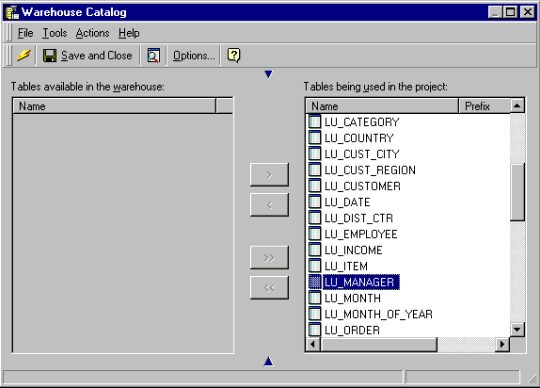
  • Open the project in which a new column is added. Select 'Schema' > 'Warehouse Catalog'.
  • Select the table to which the new column has been added as shown below.
ka04W000000Ogm8QAC_0EM440000002GG2.gif
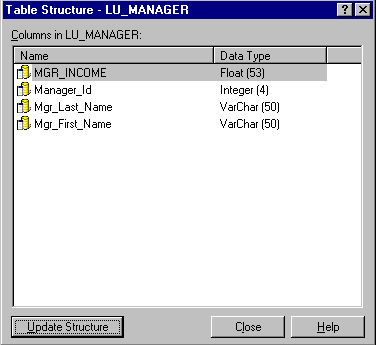
  • Access the table structure for this table as shown below, by either:
    • Right-click on the table. Select 'Update Structure'.
       
      or
       
    • Right-click on the table. Select 'Table Structure'.
ka04W000000Ogm8QAC_0EM440000002GG5.gif
  • Select 'Update Structure'.

The newly added table now appears and is available for attribute or fact creation.


Comment

0 comments

Details

Knowledge Article

Published:

June 9, 2017

Last Updated:

June 9, 2017