EducationSoftwareStrategy.com
StrategyCommunity

Knowledge Base

Product

Community

Knowledge Base

TopicsBrowse ArticlesDeveloper Zone

Product

Download SoftwareProduct DocumentationSecurity Hub

Education

Tutorial VideosSolution GalleryEducation courses

Community

GuidelinesGrandmastersEvents
x_social-icon_white.svglinkedin_social-icon_white.svg
Strategy logoCommunity

© Strategy Inc. All Rights Reserved.

LegalTerms of UsePrivacy Policy
  1. Home
  2. Topics

KB5097: Tables do not appear in the box, ’Tables available in the warehouse’, even though they are available in the warehouse in MicroStrategy Developer


Stefan Zepeda

Salesforce Solutions Architect • Strategy


In MicroStrategy Developer, even though tables that can be added to the project are available in the warehouse, tables do not appear in the 'Tables available in the warehouse' box of the Warehouse Catalog.

In Strategy Developer, even though tables that can be added to the project are available in the warehouse, tables do not appear in the 'Tables available in the warehouse' box of the Warehouse Catalog.
 
The following window appears:
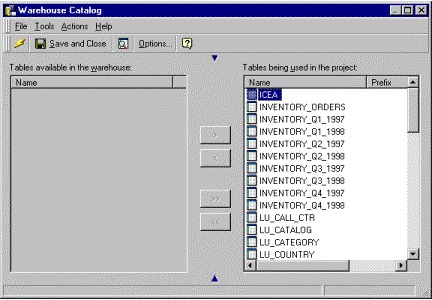
ka02R000000kbu4QAA_0EM440000002GGF.gif

There are two resolutions to this issue:
 
Resolution 1:
Click on the 'Read Warehouse Catalog' button or select Actions > Read Warehouse Catalog from the main Warehouse Catalog window.
 
OR
 
Resolution 2:
If Resolution 1 fails then follow the steps below:
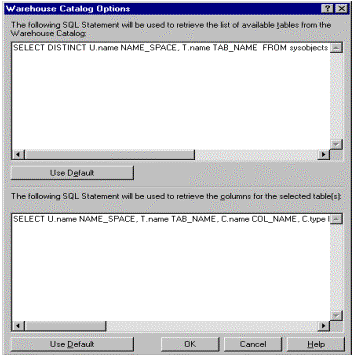
  • Select Tools > Options in the main Warehouse Catalog window.
ka02R000000kbu4QAA_0EM440000002GGF.gif
  • Select 'Settings' in the 'Catalog Read Method' section. The following image appears:
ka02R000000kbu4QAA_0EM440000002GGH.gif
  • Select the 'Use Default' button in the 'The following SQL statement used to retrieve the list of available tables from the Warehouse Catalog' section and click on 'OK'.
  • Click on the 'Read Warehouse Catalog' button or select Actions > Read Warehouse Catalog from the main Warehouse Catalog window.

The 'Tables available in the warehouse' is now populated with the list of tables available in the warehouse, as shown below. These tables can now be added to the project.
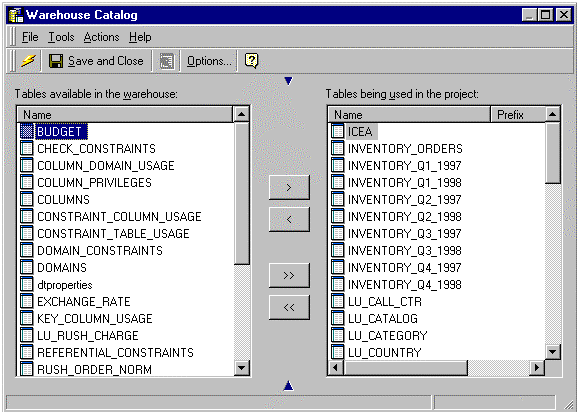
ka02R000000kbu4QAA_0EM440000002GG0.gif

Comment

0 comments

Details

Knowledge Article

Published:

June 6, 2017

Last Updated:

June 6, 2017