EducationSoftwareStrategy.com
StrategyCommunity

Knowledge Base

Product

Community

Knowledge Base

TopicsBrowse ArticlesDeveloper Zone

Product

Download SoftwareProduct DocumentationSecurity Hub

Education

Tutorial VideosSolution GalleryEducation courses

Community

GuidelinesGrandmastersEvents
x_social-icon_white.svglinkedin_social-icon_white.svg
Strategy logoCommunity

© Strategy Inc. All Rights Reserved.

LegalTerms of UsePrivacy Policy
  1. Home
  2. Topics

KB5147: How to update changes in existing table definitions in MicroStrategy Architect 9.4.x-10.x


Community Admin

• Strategy


Once a MicroStrategy Project has been created, users may choose to make changes in the warehouse, such as adding a new column in a table or changing a column name. Also, database models can change since the creation of metadata and reports which causes some table definitions to change.

Once a Strategy Project has been created, users may choose to make changes in the warehouse, such as adding a new column in a table or changing a column name. Also, database models can change since the creation of metadata and reports which causes some table definitions to change.
Follow the steps below to update changes in existing table definitions in Strategy Architect 9.4.x-10.x:
  • Select the project that has been changed.
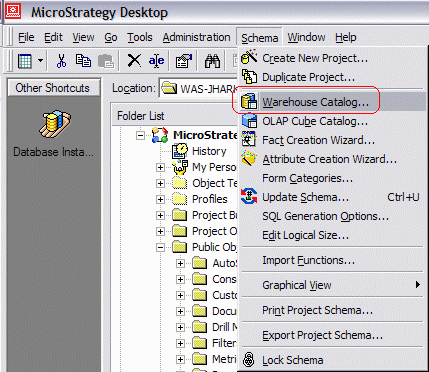
  • From the Main Menu, select 'Schema' and then 'Warehouse Catalog' as shown below:
ka04W000000Odi6QAC_0EM440000002GFr.gif
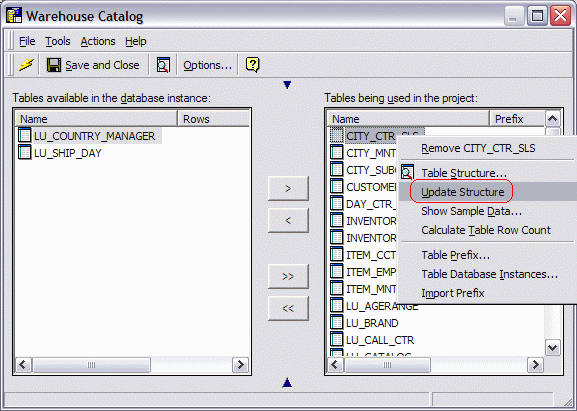
  • Select the table that has been changed from 'Tables available in the warehouse' and 'Tables being used in the project.'
  • Right-click and select 'Update Structure' as shown below:
ka04W000000Odi6QAC_0EM440000002GFv.gif

Comment

0 comments

Details

Knowledge Article

Published:

April 5, 2017

Last Updated:

April 5, 2017