The 'Driver execution mode' setting located at Configuration Managers > Database Instance > Database Connection > Advanced in Strategy Developer:
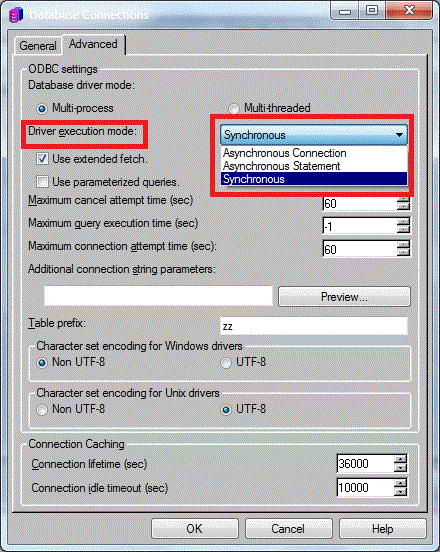
It has three options to it:
To understand these three options, it is helpful to know the terms 'henv,' 'hdbc' and 'hstmt' from the ODBC API.
'henv' is a one-to-many parent to 'hdbc' which, in turn, is a one-to-many parent to 'hstmt.' SQLExecDirect is an example of an ODBC API command. The synchronous mode is characterized by only one statement (one value of hstmt in SQLExecDirect ) executing at any one time. On the other hand, in the asynchronous mode, multiple statements (two or more values of hstmt) can execute simultaneously. The asynchronous mode itself can be set at two different levels:
When it is set at the connection level (Asynchronous Connection), all statements allocated within the connection should be able to run SQL asynchronously.
When it is set at the statement level (Asynchronous Statement), for each statement handle (hstmt value) that is allocated, the mode has to be reset.
From an end user's point of view, the choice of the 'Driver execution mode' is largely dependent on the mode that is supported by the driver being used. Some drivers support only synchronous mode while others support both asynchronous and synchronous modes of operation.
Note: As a general observation, ODBC Drivers have been engineered to be more 'intelligent' in recent years. Thus, a lot of new drivers may not support asynchronous mode as the driver is capable of opening a new thread and executing a new query while simultaneously running a query on the first one.
Recommended values for the 'Driver Execution Mode' setting for the various ODBC drivers are posted as Knowledge Base technical notes. For most ODBC drivers, 'synchronous' mode is recommended. The 'Troubleshooting' section in the 'Strategy General Information Readme' file provides a link to the appropriate Knowledge Base technical note for that particular Strategy release.
