NOTE: This document uses the 'Randbetween' function as an example. However, the concept can also be used for all other functions.
Users can use the metric created in this document to pick a random sample of Customers from a Strategy report.
NOTE: Details for this case can be found in KB4000-007-0199.
Using the 'Randbetween' function generates a random number between two values. According to the function syntax, the following metric definition is valid to create an random number between 0 and 1: Randbetween(0, 1).
NOTE: The separator ',' is dependent on the regional settings in WinNT and could change to other characters (typically to ';') in languages different from English.]
However if users run a report with that metric applied, they see one of the following error messages:
Error: SQLEngine got an Exception from DFC: Engine Logic: Failed to generate SQL -- please check dimensionality in metric definition. Error in Process method of Component: SQLEngineServer, Project 0, Job 448, Error Code= -2147212800.
Error: SQLEngine got an Exception from DFC: AppObj: ERROR: Application object has error in definition. ERROR: Application object has error in definition. Error in Process method of Component: SQLEngineServer, Project Strategy Tutorial 8.0, Job 221, Error Code= -2147212800
This issue is due to the lack of a metric dimensionality. The SQL Engine cannot create a join in the report that refers to a constant value as the constant is not stored in a warehouse table. Applying another metric to perform a join returns no values for the 'Randbetween' metric.
To get the dimensionality AND the constant '1' , users could create a metric definition similar to 'Randbetween (0,(/))'. This would perform a join on the fact table and return valid results for the metric but only if users have an attribute whose ID column exists in the same fact table as 'Sales'.
In addition, joining on large fact tables decreases performance.
The following steps guide users through a process that generates a constant that can be used in metrics and combined with every attribute of a specific project. In addition, the Strategy SQL Engine performs a crossjoin between a single-row table and the attribute's lookup table instead of joining a large fact table.
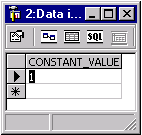

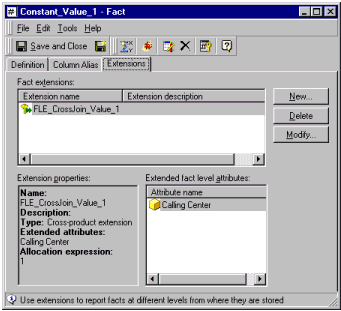
Users get the following SQL and valid results. The cross join on LU_MONTH is generated due to the Fact Level Extension:
select a12.Month_Id Month_Id,
a12.Month_Desc Month_Desc,
1 WJXBFS1
from FACT_CONSTANT a11
cross join LU_MONTH a12
If users prefer to have other constants, they can create new Facts with another Fact Level Extension.
To create a constant on '5':
This generates following SQL:
select a12.Month_Id Month_Id,
a12.Month_Desc Month_Desc,
5 WJXBFS1
from FACT_CONSTANT a11
cross join LU_MONTH a12
Users can even derive constants from the value in the warehouse table by creating the following fact:
Using this fact in a metric generates the term 'CONSTANT_VALUE * 10' in the report SQL:
select a12.Month_Id Month_Id,
a12.Month_Desc Month_Desc,
(a11.CONSTANT_VALUE * 10) WJXBFS1
from FACT_CONSTANT a11
cross join LU_MONTH a12
