EducationSoftwareStrategy.com
StrategyCommunity

Knowledge Base

Product

Community

Knowledge Base

TopicsBrowse ArticlesDeveloper Zone

Product

Download SoftwareProduct DocumentationSecurity Hub

Education

Tutorial VideosSolution GalleryEducation courses

Community

GuidelinesGrandmastersEvents
x_social-icon_white.svglinkedin_social-icon_white.svg
Strategy logoCommunity

© Strategy Inc. All Rights Reserved.

LegalTerms of UsePrivacy Policy
  1. Home
  2. Topics

KB5353: How to create a metric using a nested aggregation in MicroStrategy Developer 9.x


Stefan Zepeda

Salesforce Solutions Architect • Strategy


How to create a metric using a nested aggregation in MicroStrategy Developer 9.x

This document explains how to create a metric using a nested aggregation, that is, with a dimensionality that uses aggregation functions to previously aggregated base formulas.
 
Base formulas are individual formulas from metric definitions that contain only calculation data; they do not include level information or conditionality. The most important aspect of base formulas is that they can be reused in other metric definitions.
 
To create this metric, execute the following steps:
 

  • Open the Metric Editor (right-click and choose 'new metric') in Strategy Developer.
  • Browse to find Schema Objects > Facts and select a fact. In this example, Revenue was selected.
  • Save this metric as a base formula (not a regular metric) and close. This metric is called Revenue1 in the rest of this document.
  • Open the Metric Editor again.
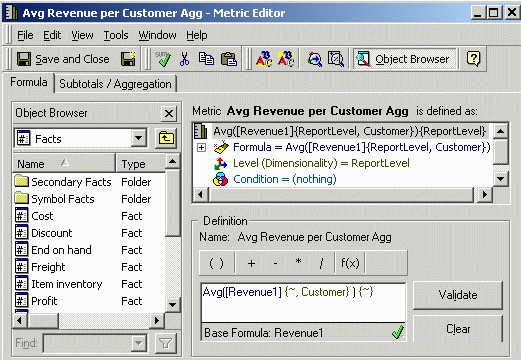
  • Drag Revenue1 into the metric definition.
  • Add the 'Customer' attribute to the dimensionality.
  • Place the 'AVG' operator before the metric formula as seen below:
ka02R000000kcbeQAA_0EM440000002GFG.gif
  •  
    In this example, the inner function is a sum of with dimensionality on . The outer function calculates the average of the inner function at the report level.

 
Please refer to KB5613(KB5200-7X0-0068) - How to use Nested Aggregation with an Average (AVG) function in Strategy 9.x for additional information.


Comment

0 comments

Details

Knowledge Article

Published:

April 11, 2017

Last Updated:

April 11, 2017