EducationSoftwareStrategy.com
StrategyCommunity

Knowledge Base

Product

Community

Knowledge Base

TopicsBrowse ArticlesDeveloper Zone

Product

Download SoftwareProduct DocumentationSecurity Hub

Education

Tutorial VideosSolution GalleryEducation courses

Community

GuidelinesGrandmastersEvents
x_social-icon_white.svglinkedin_social-icon_white.svg
Strategy logoCommunity

© Strategy Inc. All Rights Reserved.

LegalTerms of UsePrivacy Policy
  1. Home
  2. Topics

KB5390: How to convert Database Nulls to '0' so they can be sorted in MicroStrategy Developer 9.x-10.x


Stefan Zepeda

Salesforce Solutions Architect • Strategy


How to convert Database Nulls to '0' so they can be sorted in MicroStrategy Developer 9.x-10.x

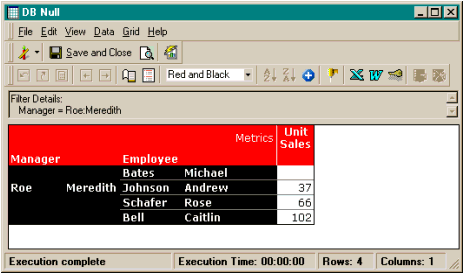
The following report is sorted on the Unit Sales metric ascending:
ka02R000000kcKSQAY_0EM440000002GFN.gif

 
If the sorting is changed to descending, the report is as follows:

ka02R000000kcKSQAY_0EM440000002GF9.gif

 
The Database Null value is still displayed on top.
 
To convert this Database Null to '0' for sorting to take effect, users must execute the following steps:

  1. Edit the metric that has the Database Nulls. For this example, Unit Sales.
  2. Change the Object Browser Location to: Functions and Operators Functions\Null/Zero Functions and add the NulltoZero Function to the metric definition.
ka02R000000kcKSQAY_0EM440000002GF7.gif

 
The report now looks like the following:
 
Sorted descending:

ka02R000000kcKSQAY_0EM440000002GFQ.gif

 
Sorted ascending:

ka02R000000kcKSQAY_0EM440000002GFD.gif

Comment

0 comments

Details

Knowledge Article

Published:

May 11, 2017

Last Updated:

May 11, 2017