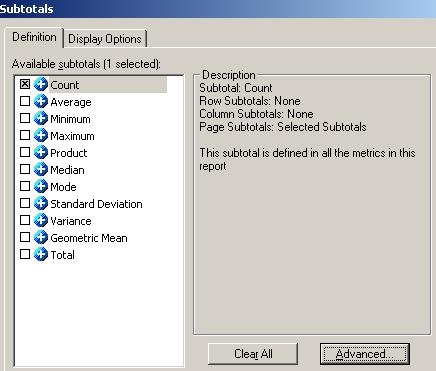
In a page-by report, users may customize the subtotals setting through the 'Advanced' subtotals options as shown below.
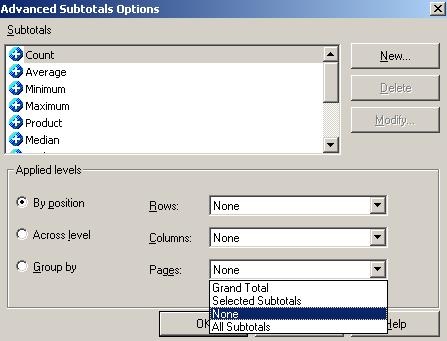
There are four subtotal options in the Pages field: 'Grand Total', 'Selected Subtotals', 'None', and 'All Subtotals' as shown below.
Selected Subtotals
When 'Selected Subtotals' is chosen, the subtotal values are calculated in an outline-like fashion. If 'Total' is selected for the first attribute in the page-by field, all subsequent attributes to the right will be calculated at the Total level automatically and no element selection is allowed.
If the second attribute, 'Country' in the example shown below, is set to 'Total', users can still select from the element list of the first attribute 'Year'. 'Category', on the other hand, is to the right of 'Country'. 'Category' will be calculated at the total level only.

All Subtotals
When 'All Subtotals' is chosen in the Advanced subtotals option, the report allows all attributes in the page-by field to calculate totals independently. Users can total on 'Year', 'Country', 'Category', or any combination of the attributes. Setting 'Country' to 'Total' does not prevent users from selecting an element in the 'Category' attribute as shown in below.
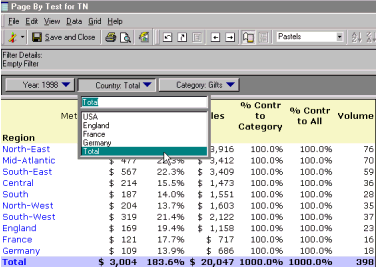
Though 'All Subtotals' provides more flexibility to users in terms of the available subtotal values, the report may take longer to execute because all possible subtotal combinations must be calculated at run time.
Grand Total
When 'Grand Total' is selected, the total is only available for the first attribute in the page-by field. Selecting 'Total' for the 'Year' attribute causes the subsequent attributes to calculate at the total level only as shown below.

