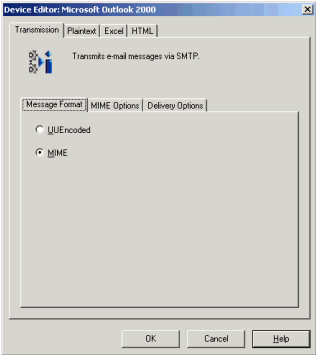
In Strategy Narrowcast Server, there are two options for message formatting: MIME and UUEncoded, as shown below. When choosing a device for Narrowcast services, it is important to understand the difference between the two formatting options and when to use them.
What does MIME stand for?
Multi-Purpose Internet Mail Extensions (MIME) is an extension of the original Internet e-mail protocol that allows users to use a formatting style to exchange different types of data files (e.g., audio, video, images, documents, etc). In addition, Multipart MIME allows many message bodies and multiple character sets in messages. Character sets other than US-American Standard Code for Information Interchange (ASCII) can be used. Multipart, related and alternative message bodies and text headers are also allowed.
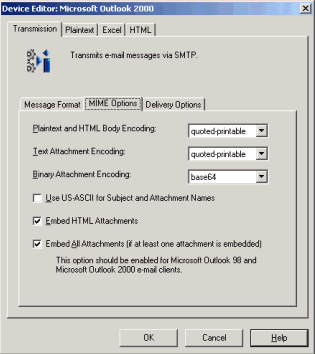
There are several available options for MIME formatted messages. The screenshot below shows the defaults for this particular device, Microsoft Outlook 2000.
NOTE: This tab is only available if MIME is selected from the Message Format tab.
From the MIME Options tab, users can select whether to use quoted-printable or base64 encoding for each of the following publication sections:
Quoted-printable encoding preserves most printable characters and only encodes non-printable or special characters. Users can read the encoded text, unlike base64 encoding, but space is not preserved. Use quoted-printable only for text files and HTML or plain text message bodies, not for binary data.
Base64 encoding is a process by which every three bytes of data are changed into four six-bit values. These values are then mapped to a 64-entry lookup table in which the selected data represents ASCII codes that are generally printable, A-Z, a-z and 0-9. This results in all of the binary data being encoded completely into printable characters that can be transmitted over the Internet without fear of bit loss. Base64 encoding is strongly recommended for any binary, image or multi-byte character set data.
Some devices do not support the use of character sets other than US ASCII for certain portions of multipart MIME e-mails. These portions include the subject line and the names of attached files. Select 'Use US-ASCII for Subject and Attachment Names' to ensure that such devices can process e-mails correctly.
NOTE: If this box is checked, the Service Designer must ensure that the names of any objects being sent as attachments to this device are no more than eight characters in length and must use only standard ASCII characters. The subject must also contain only ASCII characters. If any of these conditions are not met, the message is not sent.
Users can also select whether to 'Embed HTML Attachments' into the message body. If HTML attachments are not embedded, they are sent as unrelated attachments. If opting to embed HTML attachments, users can also choose to 'Embed All Attachments'.
NOTE: 'Embed All Attachments' should be chosen for Microsoft Outlook 98 and Microsoft Outlook 2000 e-mail clients.
What does UUEncode stand for?
UUEncode is a popular method for encoding and decoding files exchanged between users or systems in a network. It is available or easily obtainable for use in all operating systems. Most e-mail applications provide it as an encoding alternative, especially for e-mail attachments. UUEncode converts a file or e-mail attachment from its binary form into a 7-bit ASCII set of text characters.
UUEncode accepts only one plain text body in US-ASCII, with any number of attachments. The attachments are encoded using Unit-to-Unix method. This method of message formatting is suggested for any e-mail client or gateway that does not support MIME.
