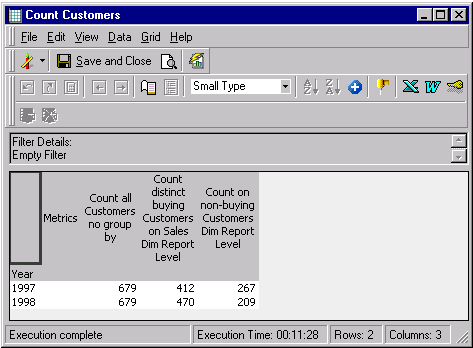
The following example creates three metrics for a report that counts the customers on year level:
Metric 1 - Count all Customers no group by - Metric Editor
See the 'Count all Customers no group by' Metric Editor screenshot below.
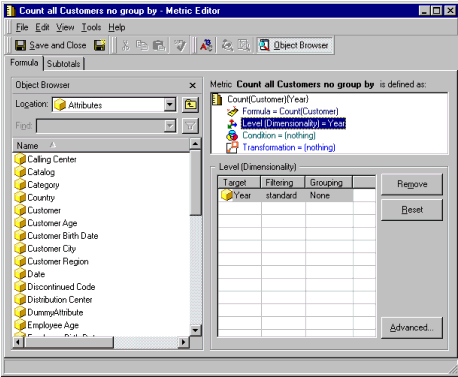
Because of the Report Level's presence on the metric's dimensionality, the Strategy Structured Query Language (SQL) Generation Engine groups by all of the attribute IDs found on the template. By removing the Report Level from the dimensionality and selecting the 'Grouping = None for the Year' attribute, the SQL Generation Engine does not group by clause.
In this case, the 'Year' attribute was randomly selected. Any attribute can be used for this purpose. There is no need to add more than one attribute, unless a special filtering behavior is required for the metric. If a special filtering behavior is required, then other attributes are added, but 'Grouping = None' is always used.
SQL:
select count(distinct a11.Customer_Id) COUNTALLCUST,
count(distinct a11.Customer_Id) COUNTALLCUST1
into #ZZT1E010029MD000
from LU_CUSTOMER a11
Metric 2 - Count distinct buying Customers on Sales Dim Report Level - Metric Editor
See the 'Count distinct buying Customers on Sales Dim Report Level' Metric Editor screenshot below.
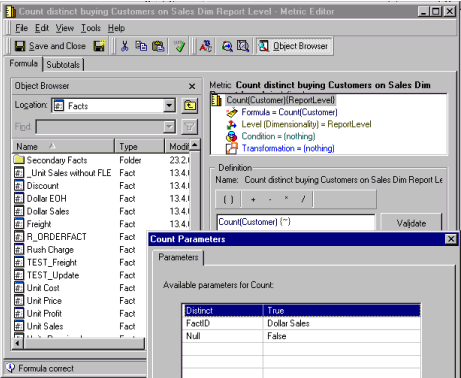
The Dimensionality is set to report level. Users can change the behavior of the count function by selecting the count in the metric definition. Right-click on the selection \ context menu 'Count Parameters'. Change the 'Distinct' value to 'True' and the 'FactID' to the fact in the fact table users would like to count on. In this example, choose all distinct customers that have a value for dollar sales in the fact table.
The SQL Generation Engine will choose a valid fact table for 'Dollar Sales' to relate the attributes in the template and group by the template's attributes (Dimensionality: Report Level).
SQL:
select a13.Year_Id Year_Id,
count(distinct a12.Customer_Id) COUNTDISTINC,
count(distinct a12.Customer_Id) COUNTDISTINC1
into #ZZT1E010029MD001
from ORDER_FACT a11
join LU_ORDER a12
on (a11.Order_Id = a12.Order_Id)
join LU_DATE a13
on (a11.Order_Date = a13.Date_Id)
group by a13.Year_Id
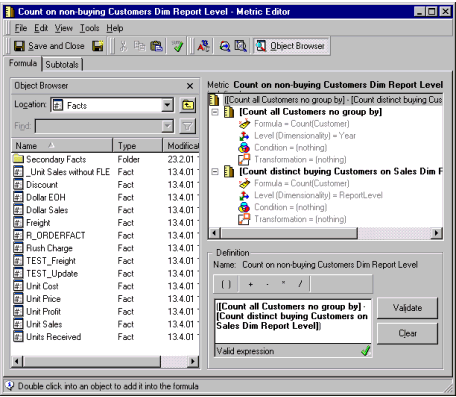
Metric 3 - Count on non-buying Customers Dim Report Level - Metric Editor
See the 'Count on non-buying Customers Dim Report Level' Metric Editor screenshot below.
SQL:
select distinct pa2.Year_Id Year_Id,
pa1.COUNTALLCUST COUNTALLCUST,
pa2.COUNTDISTINC COUNTDISTINC,
(ISNULL(pa1.COUNTALLCUST1, 0) - ISNULL(pa2.COUNTDISTINC1, 0)) COUNTONNONBU
from #ZZT1E010029MD001 pa2
cross join #ZZT1E010029MD000 pa1
Report: