EducationSoftwareStrategy.com
StrategyCommunity

Knowledge Base

Product

Community

Knowledge Base

TopicsBrowse ArticlesDeveloper Zone

Product

Download SoftwareProduct DocumentationSecurity Hub

Education

Tutorial VideosSolution GalleryEducation courses

Community

GuidelinesGrandmastersEvents
x_social-icon_white.svglinkedin_social-icon_white.svg
Strategy logoCommunity

© Strategy Inc. All Rights Reserved.

LegalTerms of UsePrivacy Policy
  1. Home
  2. Topics

KB5516: Attribute element name becomes 0 or null after a Transformation metric is added to a Report with MicroStrategy Developer


Community Admin

• Strategy


Attribute element name becomes 0 or null after a Transformation metric is added to a Report with MicroStrategy Developer.

SYMPTOM
After adding a derived metric, the attribute element name diappears or becomes 0 when there is no value returned in the derived metric while the original metric still has a value for that attribute element.
 
STEPS TO REPRODUCE
Execute the following steps in Strategy Tutorial:
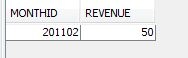
  • Create two tables: Fact table to have MONTHID and REVENUE fields,
     
ka04W000000uGDaQAM_0EM440000002DJo.jpeg
  •  
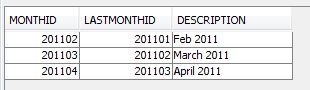
    and Lookup (Transformation) Table to have MONTHID, LASTMONTHID, and DESCRIPTION fields.
     
ka04W000000uGDaQAM_0EM440000002DJy.jpeg
  • Create a Month attribute with ID form mapped to MONTHID of both tables, and DESC form mapped to DESCRIPTION of Transformation table.
  • Create a fact mapped to REVENUE column of the fact table, and create a metric with an expression like SUM(REVENUE).
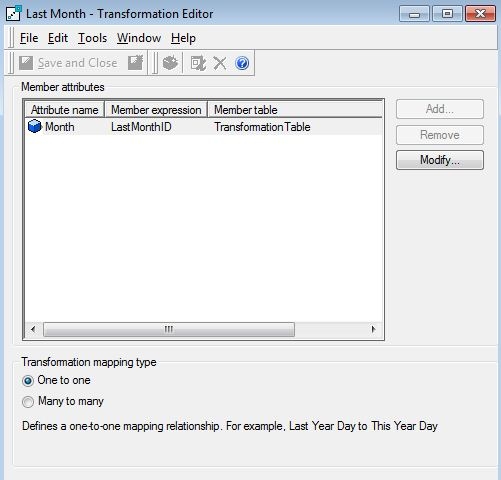
  • Create a transformation object for Month to map last month with LASTMONTHID column.
     
ka04W000000uGDaQAM_0EM440000002DJp.jpeg
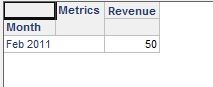
  • Create a report with Month and Revenue and notice that one row returned.
     
ka04W000000uGDaQAM_0EM440000002DJn.jpeg
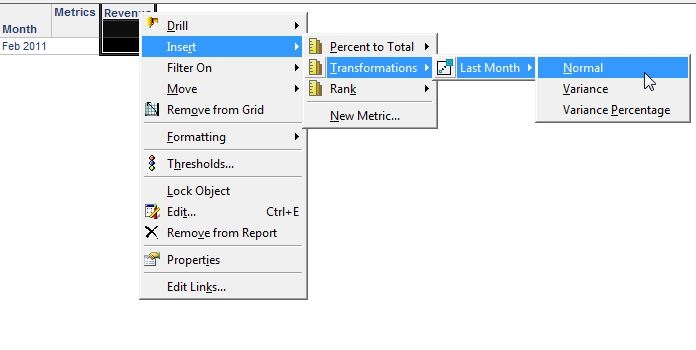
  • Right click on "Revenue," then, Insert > Transformation > Last Month > Normal.
     
ka04W000000uGDaQAM_0EM440000002DJx.jpeg
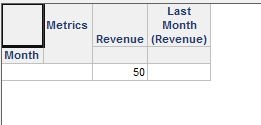
  • Notice that a new metric is inserted, but no data returned. In addition to that, Month description, 'Feb 2011' disappear.
     
ka04W000000uGDaQAM_0EM440000002DJq.jpeg

CAUSE
This is a known issue with Strategy 9.0.x and 9.2.x. Report SQL with 2nd metric is generated as follows:
Sql


with gopa1 as

(select a11.MONTHID MONTHID,

a11.REVENUE WJXBFS1

from MSU2U1.FACTTABLE a11

),


gopa2 as

(select a12.MONTHID MONTHID,

a12.DESCRIPTION DESCRIPTION,

a11.REVENUE WJXBFS1

from MSU2U1.FACTTABLE a11

join MSU2U1.TRANSFORMATIONTABLE a12

on (a11.MONTHID = a12.LASTMONTHID)

)


select pa11.MONTHID MONTHID,

pa12.DESCRIPTION DESCRIPTION,

pa11.WJXBFS1 WJXBFS1,

pa12.WJXBFS1 WJXBFS2

from gopa1 pa11

left outer join gopa2 pa12

on (pa11.MONTHID = pa12.MONTHID)
 
Since the fact table has only one row, there is no data returned for last month. Therefore, the query that tried fetching data for last month returns no data, but the final pass tried fetching Description from the derived table that is empty.
 
ACTION
Contact Strategy Technical Support for an updated status of this issue.  
 
WORKAROUND
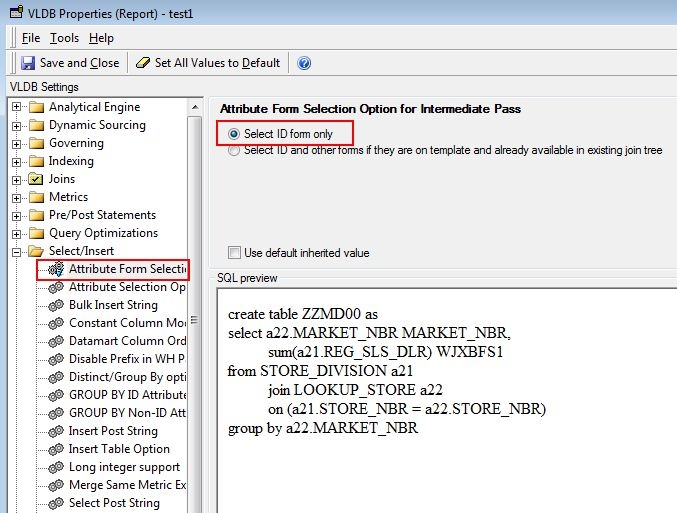
Change VLDB Properties > Select/Insert > Attribute Form Selection Option for Intermediate Pass > Select ID form only. This way, the final pass tried to join a lookup table instead of the intermediate table where the description form elements exist.

ka04W000000uGDaQAM_0EM440000002DJs.jpeg

 
After that, the report SQL changed as follows, and the result comes back fine.
SQL


with gopa1 as

(select a11.MONTHID MONTHID,

a11.REVENUE WJXBFS1

from MSU2U1.FACTTABLE a11

),

gopa2 as

(select a12.MONTHID MONTHID,

a11.REVENUE WJXBFS1

from MSU2U1.FACTTABLE a11

join MSU2U1.TRANSFORMATIONTABLE a12

on (a11.MONTHID = a12.LASTMONTHID)

)select pa11.MONTHID MONTHID,

a13.DESCRIPTION DESCRIPTION,

pa11.WJXBFS1 WJXBFS1,

pa12.WJXBFS1 WJXBFS2

from gopa1 pa11

left outer join gopa2 pa12

on (pa11.MONTHID = pa12.MONTHID)

left outer join MSU2U1.TRANSFORMATIONTABLE a13

on (pa11.MONTHID = a13.MONTHID)
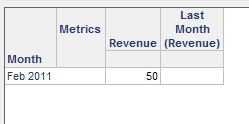
 

ka04W000000uGDaQAM_0EM440000002DJz.jpeg

 
Article Reference Number: 
KB5516


Comment

0 comments

Details

Knowledge Article

Published:

May 24, 2017

Last Updated:

December 31, 2018