EducationSoftwareStrategy.com
StrategyCommunity

Knowledge Base

Product

Community

Knowledge Base

TopicsBrowse ArticlesDeveloper Zone

Product

Download SoftwareProduct DocumentationSecurity Hub

Education

Tutorial VideosSolution GalleryEducation courses

Community

GuidelinesGrandmastersEvents
x_social-icon_white.svglinkedin_social-icon_white.svg
Strategy logoCommunity

© Strategy Inc. All Rights Reserved.

LegalTerms of UsePrivacy Policy
  1. Home
  2. Topics

KB5519: How to show only projects to which users have access to on the Projects Page in MicroStrategy Web


Community Admin

• Strategy


After navigating to MicroStrategy Web from their browsers, end users may see a list of all the loaded projects connected to that MicroStrategy Web instance even when their MicroStrategy user does not have access to some of these projects. This occurs because the end user has not yet logged into MicroStrategy but has already accessed the Projects Page. To prevent displaying all projects to end users, consider enabling the "Log in first, then show projects" option in the MicroStrategy Web Administrator.

After navigating to Strategy Web from their browsers, end users may see a list of all the loaded projects connected to that Strategy Web instance even when their Strategy user does not have access to some of these projects. This occurs because the end user has not yet logged into Strategy but has already accessed the Projects Page. To prevent displaying all projects to end users, consider enabling the "Log in first, then show projects" option in the Strategy Web Administrator. With this setting enabled, end users will have to log in to their Strategy user account first before being presented with the Projects Page.
Enable this setting by following the steps below:
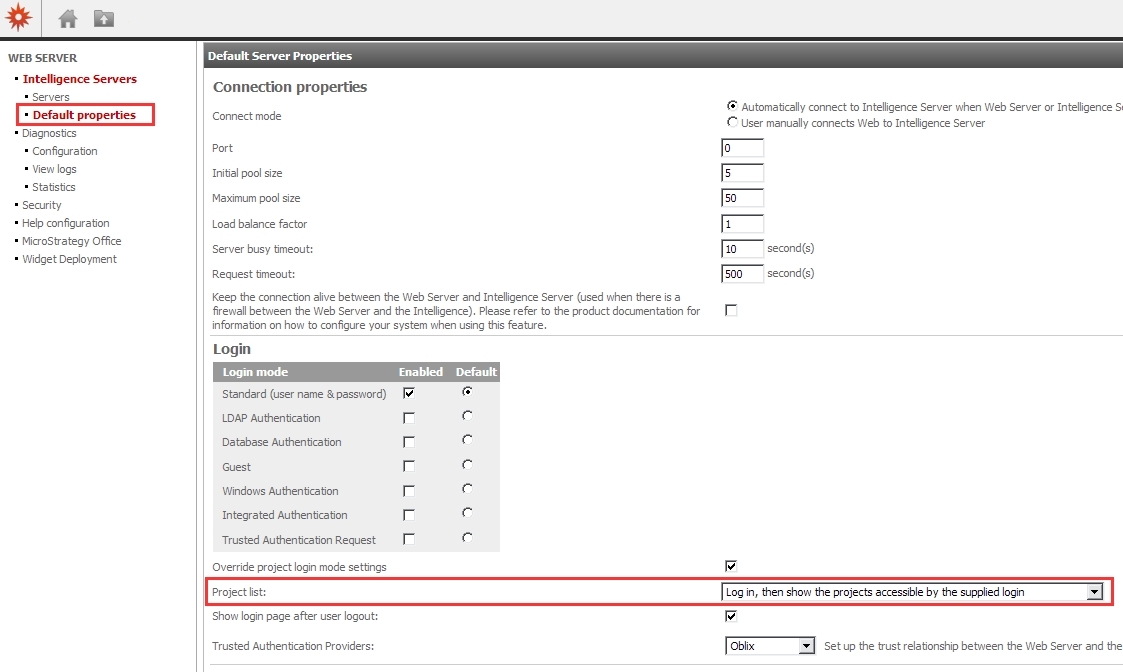
  1. Navigate to the Strategy Web Administration page
  2. Under Default properties, locate the Project list dropdown and select "Log in, then show the projects accessible by the supplied login"
     
ka04W00000148etQAA_0EM44000000297Y.jpeg

Comment

0 comments

Details

Knowledge Article

Published:

March 30, 2017

Last Updated:

March 30, 2017