EducationSoftwareStrategy.com
StrategyCommunity

Knowledge Base

Product

Community

Knowledge Base

TopicsBrowse ArticlesDeveloper Zone

Product

Download SoftwareProduct DocumentationSecurity Hub

Education

Tutorial VideosSolution GalleryEducation courses

Community

GuidelinesGrandmastersEvents
x_social-icon_white.svglinkedin_social-icon_white.svg
Strategy logoCommunity

© Strategy Inc. All Rights Reserved.

LegalTerms of UsePrivacy Policy
  1. Home
  2. Topics

KB5573: How to create duplicate rows using merge header cells in MicroStrategy Developer


Stefan Zepeda

Salesforce Solutions Architect • Strategy


Creating duplicate rows using merge header cells in MicroStrategy Developer.

Consider the example below when filling in empty cells with similar cells (e.g., 'USA') in the Country column.
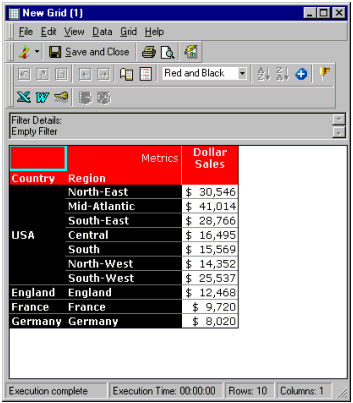
ka02R000000kYACQA2_0EM440000002GE9.gif

 
Perform the following steps:
 

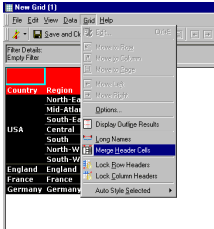
  • In the Report Editor, go to the 'Grid' menu.
  • Select 'Merge Header Cells' as shown below.
ka02R000000kYACQA2_0EM440000002GE8.gif

 
After performing these steps, the blank cells will be filled with 'USA' for each row as shown below. This feature is can be beneficial when exporting data to another application.
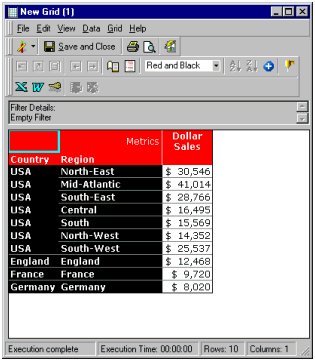
ka02R000000kYACQA2_0EM440000002GEK.gif


Comment

0 comments

Details

Knowledge Article

Published:

June 9, 2017

Last Updated:

June 9, 2017