Strategy Web supports only text files as a valid input for the Import Filter from File feature. The reason for this is to facilitate the processing of the files in the Strategy Web server.
It is important to note that this limitation discards binary files such as spreadsheets but still allows eXtensible Markup Language (XML) files as an input. The section 'Other list formats' in this document explains more about this.
The content of the input file is the list of the elements to be included as an answer to the prompt. The elements should be in accordance to the attribute form selected in the 'Attribute' section of the prompt.
Strategy Web is not able to differentiate between an ID or a Description by itself.
Strategy Web supports two separators for the list:
The following are examples of valid lists for Year(ID):
Input File Extension:
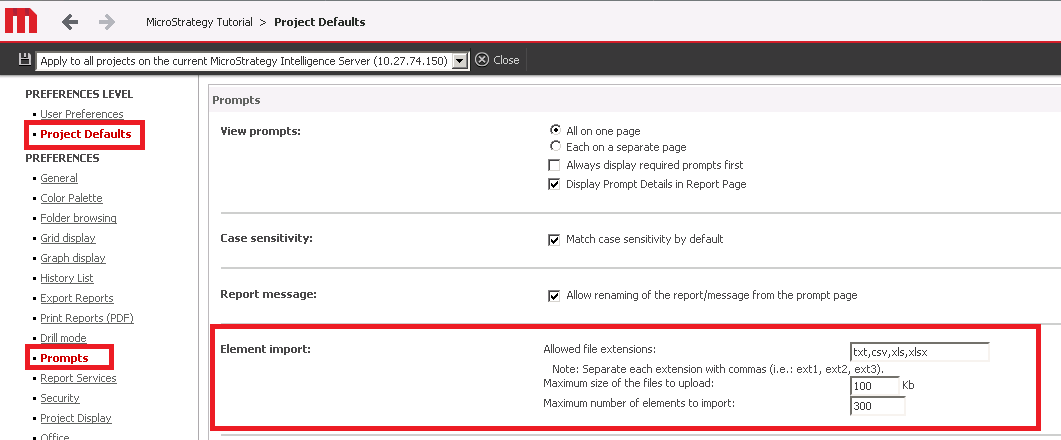
The input file can be generated from a text editor or a spread sheet application such as Microsoft Excel. Since each of these programs generates different file extensions, Strategy Web provides the ability to indicate which file extension is being used. This is a project wide setting. To modify it: go to Preferences > Project Defaults > Prompts. The setting is under Element Import: - 'Allowed file extensions'.
WARNING:
Manually editing codes of Strategy products may cause serious, project-wide problems. Since these are user-initiated changes in the code, they are not covered by any Strategy warranty and Strategy can not be held accountable for these changes. Users are strongly encouraged to backup their files for a safe return prior to any changes.
