As the creation of an ODBC connection is quite expensive, Strategy Intelligence Server uses connection caching to manage multiple users running reports against the warehouse.
The following two settings modulate the connection-caching behavior employed by Strategy Intelligence Server. When a user creates a new database connection and clicks on the Advanced tab, the following screen appears:
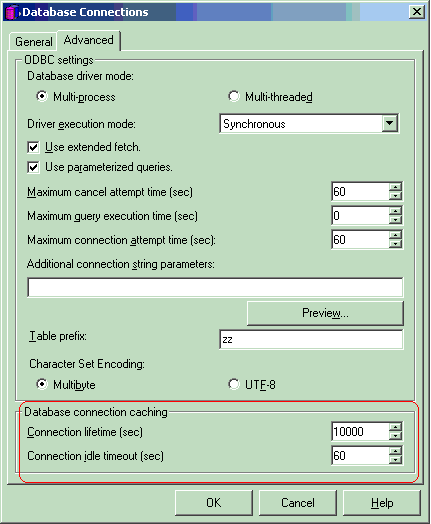
Connection lifetime:
This is the amount of time that an ODBC connection will be kept alive. The entire duration of the connection cannot be longer than this limit. A value of '0' indicates that the connection will not be cached and will be immediately deleted after the completion of execution on the database. Even though the lifetime of the connection is 0, a new database connection will be spawned when required and after the completion of the job, the connection will be immediately deleted. A value of '-1' indicates that there is no limit on the lifetime of the connection. Depending on the status of the connection at the time the limit is reached, several things can happen:
However, the connection lifetime setting has to be used carefully. If this setting is too long, the Relational Database Management System (RDBMS) timeout setting for connections (set by database administrator) can delete the connection whether it in in the middle of a a job or not. Ideally the users should set the Connection lifetime to be shorted than the RDBMS limit.
Connection Idle Timeout:
This is the amount of time an inactive connection thread remains cached in Intelligence Server until it is terminated. When a database connection finishes a job and there is no job waiting to use it, the connection is cached and a timer starts counting. If the time reaches the Connection idle timeout limit, the database connection thread is deleted. This is used to prevent connections from tying up data warehouse and Intelligence Server resources if they are not needed. A value of '0' indicates that a connection will not be cached i.e. as soon as an active connection becomes idle, that connection will be deleted. A value of '-1' indicates that there is no limit on the time that a connection can remain idle. If the connection lifetime limit is smaller than than the idle timeout limit, the connection will get deleted once the connection lifetime limit is reached.
Consider the following case under this scenario; Report A takes two minutes to execute and Report B takes 59 minutes to execute against the database with one hour connection limit (RDBMS limit). The Connection Idle Timeout is set to one minute.
Users submit Report A and Report B at 12:00 p.m. Report A creates a connection and runs. At 12:02 Report A finishes and Report B immediately gets put into the same connection due to connection caching. The Connection Idle Timeout has not yet invalidated the cached connection because the connection was idle less than a minute between Report A and Report B. So now, at 1:00 p.m., Report B has been running 58 minutes - it has one more minute to go. But, the RDBMS limit of one hour kills the connection and Report B fails. This failure is due to the implementation of Connection Caching. Without Connection Caching Report B would always run. Connection Lifetime setting can be used to alleviate this problem. Set it to the RDBMS limit minus the time of the longest job.
In the example above, the RDBMS limit equals one hour. The time of the longest job equals 59 minutes. Hence Connection Lifetime value is one minute(one hour - 59 minutes). That means that after Report A finishes running, the connection cache would timeout and the connection will be deleted. Report B would then get a brand new connection and will finish execution instead of failing in between.
Note: Unlike the RDBMS limit, the Connection Lifetime setting does NOT expire and fail a report in mid run.
If the database is configured to have a timeout, then it will be necessary to manipulate the Connection Lifetime as discussed above.
