SYMPTOM:
The 'Add to my History List' option is not available for users in Strategy Web as shown below.
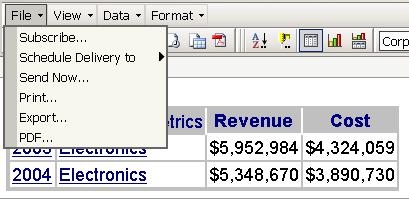
CAUSE:
This is caused by incorrect privilege settings in Strategy Developer.
ACTION:
To use the 'Add to my History List' option, users must have the 'Web Simultaneous Execution' privilege and the 'Web View History List' privilege. To set these privileges, in Strategy Desktop, go to 'Administration' > 'User Manager' as shown below.

After granting these privileges, the 'Add to my History List' option is available as shown below.

5604
