EducationSoftwareStrategy.com
StrategyCommunity

Knowledge Base

Product

Community

Knowledge Base

TopicsBrowse ArticlesDeveloper Zone

Product

Download SoftwareProduct DocumentationSecurity Hub

Education

Tutorial VideosSolution GalleryEducation courses

Community

GuidelinesGrandmastersEvents
x_social-icon_white.svglinkedin_social-icon_white.svg
Strategy logoCommunity

© Strategy Inc. All Rights Reserved.

LegalTerms of UsePrivacy Policy
  1. Home
  2. Topics

KB5656: How to control the number of messages that can be stored in the History list in the MicroStrategy Intelligence Server


Community Admin

• Strategy


Maximum number of messages per user
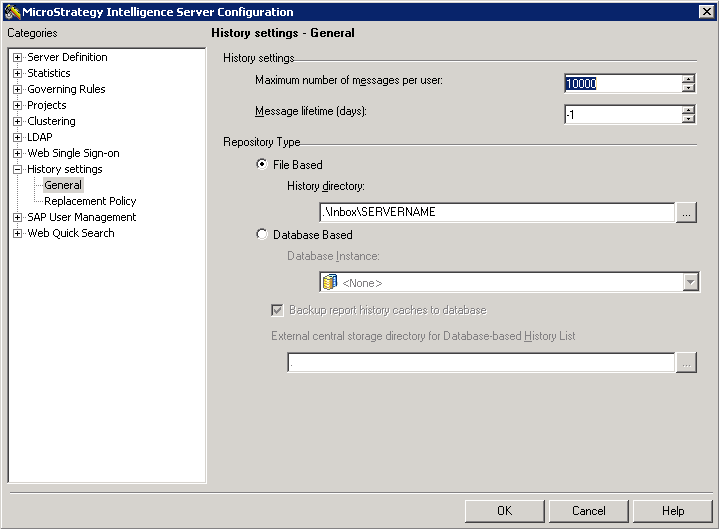
This setting controls how many messages can exist in a user’s History List. When the limit is reached, the oldest message is removed. Strategy administrator can set the maximum number of messages to be stored in each user's History list by following the steps below:
  1. Launch Strategy Developer.
  2. Right-click on the 3-tier mode project source.
  3. Select 'Configure Strategy Intelligence Server'
  4. Navigate to: History Settings -> General
  5. Setting the 'Maximum Number of messages per user' to the required number as seen below.
ka04W000000OenRQAS_0EM440000002Nrg.png


Comment

0 comments

Details

Knowledge Article

Published:

June 5, 2017

Last Updated:

June 5, 2017