EducationSoftwareStrategy.com
StrategyCommunity

Knowledge Base

Product

Community

Knowledge Base

TopicsBrowse ArticlesDeveloper Zone

Product

Download SoftwareProduct DocumentationSecurity Hub

Education

Tutorial VideosSolution GalleryEducation courses

Community

GuidelinesGrandmastersEvents
x_social-icon_white.svglinkedin_social-icon_white.svg
Strategy logoCommunity

© Strategy Inc. All Rights Reserved.

LegalTerms of UsePrivacy Policy
  1. Home
  2. Topics

KB5659: How to fix inconsistencies for a User or User Group in MicroStrategy Developer 9.x and 10.x


Stefan Zepeda

Salesforce Solutions Architect • Strategy


How to fix inconsistencies for a User or User Group in MicroStrategy Developer 9.x and 10.x

The following procedure describes how to fix inconsistencies for a user or user group via Strategy Developer 9.x and 10.x by using the User Manager Integrity Checker, which detects and fixes inconsistency issues for users.
 
Inconsistencies usually occur when a user or group is deleted but its links to other objects still exist. To use this tool, users must follow the steps outlined below:
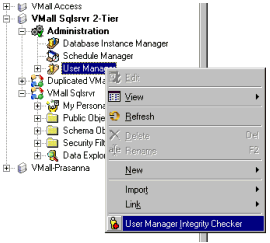
  • Right-click on User Manager and select 'User Manager Integrity Checker'
ka04W000001IqgYQAS_0EM440000002GDl.gif
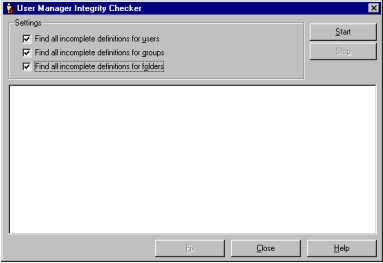
  • Enter all necessary settings.
ka04W000001IqgYQAS_0EM440000002GDm.gif
  • Click on 'Start' to search for inconsistencies. The results will be shown when the search is complete.
  • Click on 'Fix' to fix any inconsistencies found.
  • If the User Manager Integrity Checker does not identify any inconsistencies and issues still persist, please see the following Strategy Knowledge Base documents for additional tools that may be used to resolve Metadata inconsistencies:
    KB35809: Using ScanMD to fix known logical metadata inconsistencies in the MicroStrategy Product Suite 9.4.x - 10.2 Hotfix1
    KB295369: Using ScanMD to fix known logical metadata inconsistencies in the MicroStrategy Product Suite 10.3 and later

Comment

0 comments

Details

Knowledge Article

Published:

October 16, 2017

Last Updated:

October 16, 2017