To access the governing settings in the Strategy Narrowcast Administrator for Delivery Engine, users must follow the steps below:
These settings are:
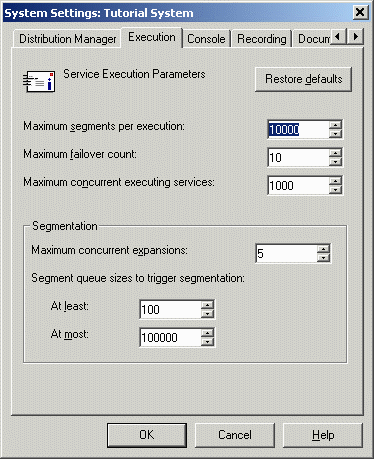
Maximum concurrent expansions:
It is the largest number of services for which the distribution manager performs segmentation at any one time.
Segment queue sizes to trigger segmentation:
It controls when services are segmented based upon the current size of the segment queue. This setting can be used to ensure that the system is not overloaded by execution requests.
Example:
If the settings for the Segment queue are as follows:
Suppose a first service is segmented and it puts 50 segments on the segment queue. Then a second service is segmented and it puts another 50 segments on the queue. At this point, the maximum number of segments (100, for this example) have been reached; therefore, no more services will be segmented until the queue decreases.
In another example, suppose a first service is segmented and it puts 6 segments on the segment queue. Then a second service is segmented and it puts another 6 segments on the queue. At this point, there will be 12 segments on the queue, bypassing the 'At least' parameter (10, for this example). Therefore, only incoming services that have a greater priority than those already on the segment queue will be segmented. (Service Priority will only be of importance if the number of segments in the queue is between the 'At least' and 'At most' parameters.)
