EducationSoftwareStrategy.com
StrategyCommunity

Knowledge Base

Product

Community

Knowledge Base

TopicsBrowse ArticlesDeveloper Zone

Product

Download SoftwareProduct DocumentationSecurity Hub

Education

Tutorial VideosSolution GalleryEducation courses

Community

GuidelinesGrandmastersEvents
x_social-icon_white.svglinkedin_social-icon_white.svg
Strategy logoCommunity

© Strategy Inc. All Rights Reserved.

LegalTerms of UsePrivacy Policy
  1. Home
  2. Topics

KB5672: How to use the 'Correlation' analytical function in MicroStrategy Developer 9.x


Stefan Zepeda

Salesforce Solutions Architect • Strategy


How to use the 'Correlation' analytical function in MicroStrategy Developer 9.x

The correlation coefficient measures how much two variables are 'co-related'. If there is no co-relationship, then the correlation coefficient equals 0. If the two variables are perfectly co-related, then the coefficient equals 1. If one variable is perfectly related to the reverse of the other, then the coefficient equals -1.
 
Considering this, users can build a simple report using VMall which includes:
  1. Country attribute
  2. Dollar sales metric
  3. Discount metric
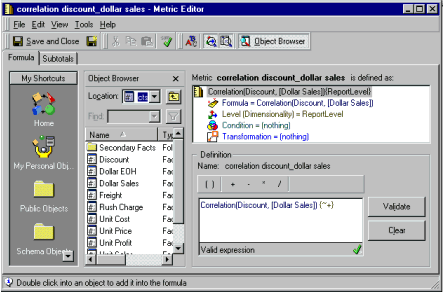
  4. Correlation metric between discount (fact) and dollar sales (fact) built as illustrated in the following screenshots (Correlation function can be found under Statistics Functions)
ka02R000000kcKGQAY_0EM440000002GDk.gif

 
NOTE: In this formula, users do not have to perform any sum on the facts.
 
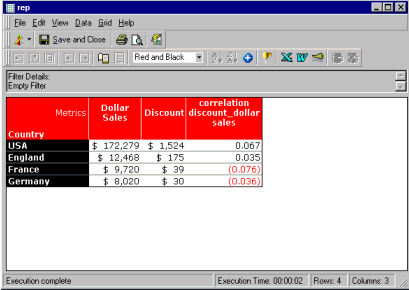
The screenshot below illustrates the result set of the report:
ka02R000000kcKGQAY_0EM440000002GDj.gif


Comment

0 comments

Details

Knowledge Article

Published:

May 11, 2017

Last Updated:

May 11, 2017