EducationSoftwareStrategy.com
StrategyCommunity

Knowledge Base

Product

Community

Knowledge Base

TopicsBrowse ArticlesDeveloper Zone

Product

Download SoftwareProduct DocumentationSecurity Hub

Education

Tutorial VideosSolution GalleryEducation courses

Community

GuidelinesGrandmastersEvents
x_social-icon_white.svglinkedin_social-icon_white.svg
Strategy logoCommunity

© Strategy Inc. All Rights Reserved.

LegalTerms of UsePrivacy Policy
  1. Home
  2. Topics

KB5777: How to remove LTRIM function from the SQL that is generated for Oracle in MicroStrategy SQL Generation Engine


Community Admin

• Strategy


This article notes how to remove LTRIM functions from SQL generated against Oracle

 
When running reports against Oracle Warehouse, LTRIM is added by default to SQL when a division is performed.
select a12.YEAR_ID YEAR_ID,
    sum(a11.SALES) SALES,
    sum(a11.Quant) QUANT,
    (sum(a11.SALES) / LTRIM(sum(a11.Quant), 0)) WJXBFS1
from   FACT a11,
    lu_month a12
where   a11.MONTH_ID = a12.MONTH_ID
group by     a12.YEAR_ID
 
To remove LTRIM function from the denominator, users must perform the following steps:
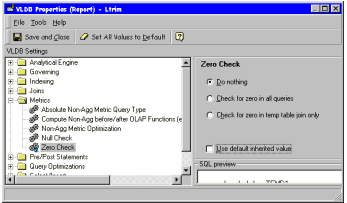
  1. Go to VLDB properties at report or database instance level.
  2. Access the Metrics folder.
  3. Click the VLDB property 'Zero check.'
  4. Uncheck 'Use default inherited value.'
  5. Check 'Do Nothing.'
  6. Save and close the VLDB properties.
ka04W000000OhODQA0_0EM440000002GDR.gif

 
The result is similar to the following:
select a12.YEAR_ID YEAR_ID,
    sum(a11.SALES) SALES,
    sum(a11.Quant) QUANT,
    (sum(a11.SALES) / sum(a11.Quant)) WJXBFS1
from   FACT a11,
    lu_month a12
where   a11.MONTH_ID = a12.MONTH_ID
group by     a12.YEAR_ID
 
Zero Check is enabled by default and LTRIM is added to prevent division by zero.


Comment

0 comments

Details

Knowledge Article

Published:

May 23, 2017

Last Updated:

May 23, 2017