EducationSoftwareStrategy.com
StrategyCommunity

Knowledge Base

Product

Community

Knowledge Base

TopicsBrowse ArticlesDeveloper Zone

Product

Download SoftwareProduct DocumentationSecurity Hub

Education

Tutorial VideosSolution GalleryEducation courses

Community

GuidelinesGrandmastersEvents
x_social-icon_white.svglinkedin_social-icon_white.svg
Strategy logoCommunity

© Strategy Inc. All Rights Reserved.

LegalTerms of UsePrivacy Policy
  1. Home
  2. Topics

KB5779: Update the database type in MicroStrategy


Ling Jing

Product Owner, Principal • MicroStrategy


This article explains how to update the database type in MicroStrategy,

When a new version of Strategy is released, sometimes there are changes in the Database Management Software (DBMS) object. The DBMS object is the database type for the database instance. It exists at the top of the Very Large Database (VLDB) properties hierarchy (KB3632- What is the hierarchy for the Strategy VLDB Settings?) and contains all the default set of VLDB properties for each database type and version. When no VLDB properties have been changed by users (all the 'use default inherited value' checkboxes are marked), values are inherited from this DBMS object.
 
A DBMS object is assigned to a project by the database instance that the project uses and is set by the 'Database connection type':
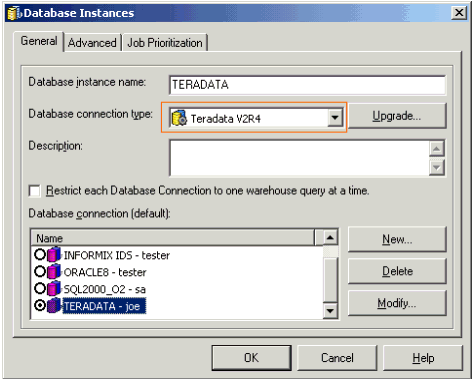
 

ka04W000001Iv1jQAC_0EM440000002GDa.gif

The DBMS object specification is stored in the \\Common Files\ Strategy\Database.PDS file. This file is only read under the following conditions:
 

  1. A new metadata shell is created - the Database.PDS file is read and its values are inserted into the metadata.
  2. An older version of Strategy metadata is used in a new version of Strategy project- the database settings are read from the Database.PDS to generate SQL.
  3. A DBMS object is upgraded - when a new Strategy version is released and the user upgrades the 'Database connection type' for the project.

The following steps explain how to perform the third situation mentioned above - the update of the 'Database connection type' (DBMS object) for a project in Teradata V2R4. To upgrade a different DBMS object, substitute its name in the instructions below:
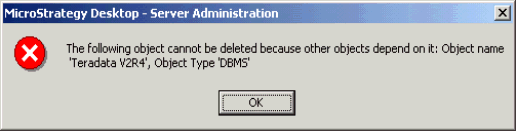
 

  • Open the database instance for the project.
  • Click on the upgrade button.
  • The upgrade database type window appears.
  • Click the Load button. This reads the settings from the updated DATABASE.PDS file.
  • Select Teradata V2R4 and move it to the right using the > button. If a message saying that the type already exists, click on Yes to update it.
ka04W000001Iv1jQAC_0EM440000002GDX.gif
  • Click OK.
  • Save the database instance.
  • Disconnect and reconnect to the project source in two-tier. If an Intelligence Server is connected to this metadata, it should be restarted at this time.
  • SQL is generated using the new DBMS object settings from the Database.PDS file.

IMPORTANT: VLDB properties customized at different levels in the project will not be lost or altered by this upgrade. The upgrade affects the default values for the database type only.
 
WARNING:
Manually editing values in the Strategy .pds file incorrectly may cause serious, project-wide problems that may make your project unusable. Since these are user initiated changes they are not covered by any Strategy warranty. Users are strongly encouraged to backup the Strategy .pds file prior to any alteration.


Comment

0 comments

Details

Knowledge Article

Published:

April 11, 2017

Last Updated:

March 4, 2024