EducationSoftwareStrategy.com
StrategyCommunity

Knowledge Base

Product

Community

Knowledge Base

TopicsBrowse ArticlesDeveloper Zone

Product

Download SoftwareProduct DocumentationSecurity Hub

Education

Tutorial VideosSolution GalleryEducation courses

Community

GuidelinesGrandmastersEvents
x_social-icon_white.svglinkedin_social-icon_white.svg
Strategy logoCommunity

© Strategy Inc. All Rights Reserved.

LegalTerms of UsePrivacy Policy
  1. Home
  2. Topics

KB5837: Users are unable to grant a group permission to an object in MicroStrategy Developer


Stefan Zepeda

Salesforce Solutions Architect • Strategy


Users are unable to grant a group permissions to an object in MicroStrategy Developer when they right-clicking on the object and go to Properties > 'Security' tab > Add > double-click on the 'group name' > 'OK.'

SYMPTOM:
Users are unable to grant a group permissions to an object in Strategy Developer when they right-clicking on the object and go to Properties > 'Security' tab > Add > double-click on the 'group name' > 'OK.'
 
In the example below, the 'Everyone' group is trying to be added to the security access control list (ACL) of an object:

ka02R000000kbqmQAA_0EM440000002GDT.gif

 
After clicking on 'OK', the 'Everyone' group is still not added:

ka02R000000kbqmQAA_0EM440000002GDV.gif

 
ACTION:
When adding groups, do not double-click on the actual group name, but simply highlight the group name and select 'OK.'
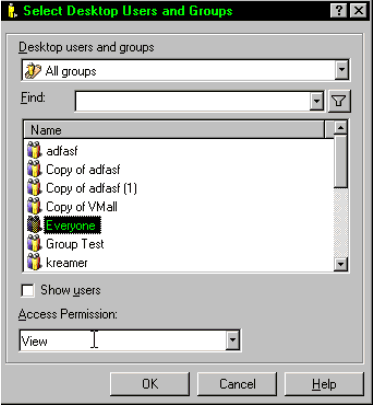
ka02R000000kbqmQAA_0EM440000002GDU.gif

 
The group should now be added, as shown below. If users double-click on the 'Everyone' group, it opens all the users in the group instead of adding the 'Everyone' group to the list.
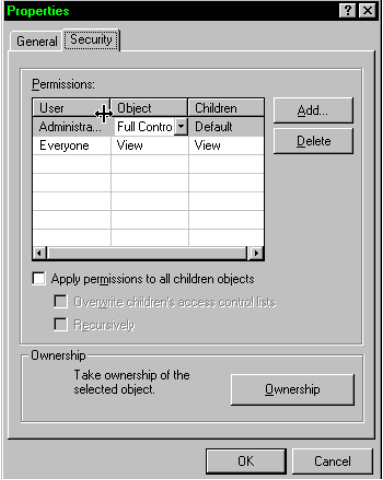
ka02R000000kbqmQAA_0EM440000002GDS.gif

Comment

0 comments

Details

Knowledge Article

Published:

June 7, 2017

Last Updated:

June 7, 2017