EducationSoftwareStrategy.com
StrategyCommunity

Knowledge Base

Product

Community

Knowledge Base

TopicsBrowse ArticlesDeveloper Zone

Product

Download SoftwareProduct DocumentationSecurity Hub

Education

Tutorial VideosSolution GalleryEducation courses

Community

GuidelinesGrandmastersEvents
x_social-icon_white.svglinkedin_social-icon_white.svg
Strategy logoCommunity

© Strategy Inc. All Rights Reserved.

LegalTerms of UsePrivacy Policy
  1. Home
  2. Topics

KB5908: What does 'Default' mean under the permissions on the security tab in MicroStrategy Developer 9.x and 10.x


Stefan Zepeda

Salesforce Solutions Architect • Strategy


Illustrates the "Everyone" permission in MicroStrategy when defining ACLs for objects

 
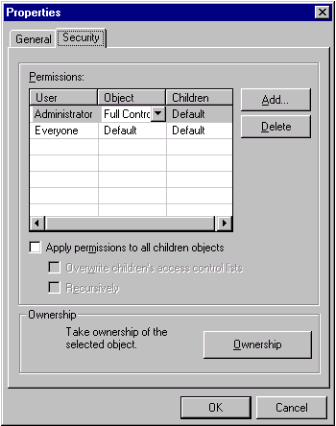
If a user or a group is assigned the permission 'Default' for the object security, that user or group will have no access to that object as illustrated below:
ka02R000000kcFCQAY_0EM440000002GDN.gif

 
From the above picture, none of the users from 'Everyone' group will have access to this object.
 
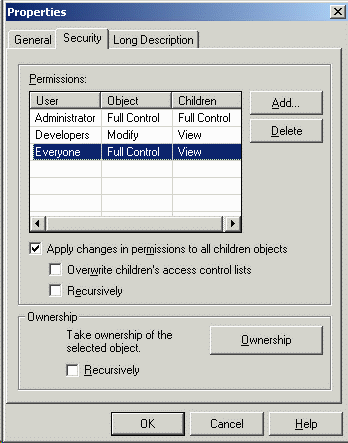
However, if 'Everyone' group has Full Control, View or Modify permissions in the object's parent folder and checks the "Apply Changes in permissions to all children objects" setting, then the user will be able to see the object.
ka02R000000kcFCQAY_0EM440000002GDK.gif


Comment

0 comments

Details

Knowledge Article

Published:

May 17, 2017

Last Updated:

May 17, 2017