Restarter is a feature in Strategy Intelligence Server that restarts the Strategy Intelligence Server automatically if the process is terminated abnormally. The Restarter can be configured to restart the Intelligence Server service automatically if it fails, but the machine on which it is installed is still running. The Strategy Listener service must be running for the restarter feature to work.
This feature is turned on by default. Using the default setting, Strategy Intelligence Server is restarted within six seconds after the process is terminated abnormally. If the process is again terminated abnormally within ten minutes from the first occurrence, Strategy Intelligence Server does not restart automatically anymore.
This feature is turned on again if any of the following happens:
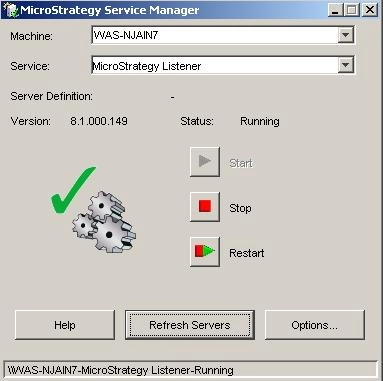
To start Intelligence Server service automatically (when it fails unexpectedly) using the Restarter:
The governing settings for this feature are stored in the Windows registry. The procedure below describes how to adjust the settings.
Note: Remember to restart Strategy Listener after any changes that are made in this registry.
All the settings described below can be found in:
.
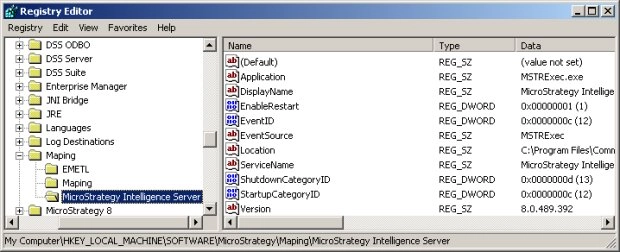
Turn automatic restarter on or off:
The following procedure describes how to turn on and off the restarter feature:
Additional Settings:
Maximum time before Strategy Intelligence Server is restarted:
The following procedure describes how to adjust the checking frequency. It specifies the time between two service checkings (during this time the restarter waits for the event log). In users' perspective, this setting can be thought of as the maximum time allowed before Strategy Intelligence Server is restarted.
Maximum number of times server is restarted within the 'RestartTimeout' time:
The following procedure describes how to adjust the maximum number of times the restarter tries to restart the service within a given period of time (that is set by another setting: RestartTimeout ). The default value of this setting is '2', which means that the Strategy Intelligence Server is restarted only once during the period of time.
Period of time where maximum number of Strategy Intelligence Server restarts apply:
The following procedure describes how to adjust the period of time where the MaxRestarts setting applies. After this period of time is exceeded, the MaxRestarts setting is reset. The default value is '10 min' (ten minutes) specified in multiple of WaitEventTimeout. As the default value of WaitEventTimeout is '6 seconds', then 10 minutes corresponds to 100 times this value.
Lock Timeout:
The following procedure describes how to adjust the time the restarter waits for the executable to be unlocked before trying to restart the service. The default value is '1 min' (one minute), expressed in multiple of 500 milliseconds.
Note: It is not recommended to modify this setting.
The restarter is controlled by two other registry values:
RestarterFrequencyInSeconds
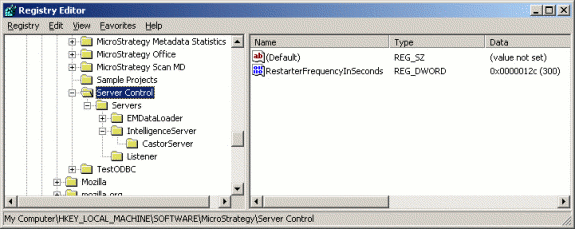
This value controls how often the Strategy Listener checks the Intelligence Server's status for an unexpected shutdown.
RestartIfProcessUnexpectedlyQuit
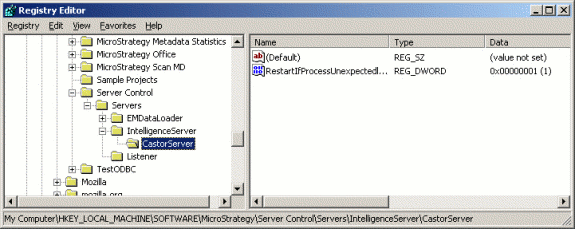
This controls whether the restarter will apply to the production server instance, CastorServer. If this value is 0, the Intelligence Server will not restart automatically if it shuts down unexpectedly. If it is 1, automatic restarts are enabled.
WARNING:
Modifying registry values incorrectly may cause serious, system-wide problems that may require the re-installation of Microsoft Windows NT. Any edit of the registry is done at the user's own risk. Since these are user-initiated changes, they are not covered by any Strategy warranty. If using Microsoft Windows NT, the user should backup the registry and/or update an Emergency Repair Disk (ERD) prior to alterations.
